
Base, Visual Builder
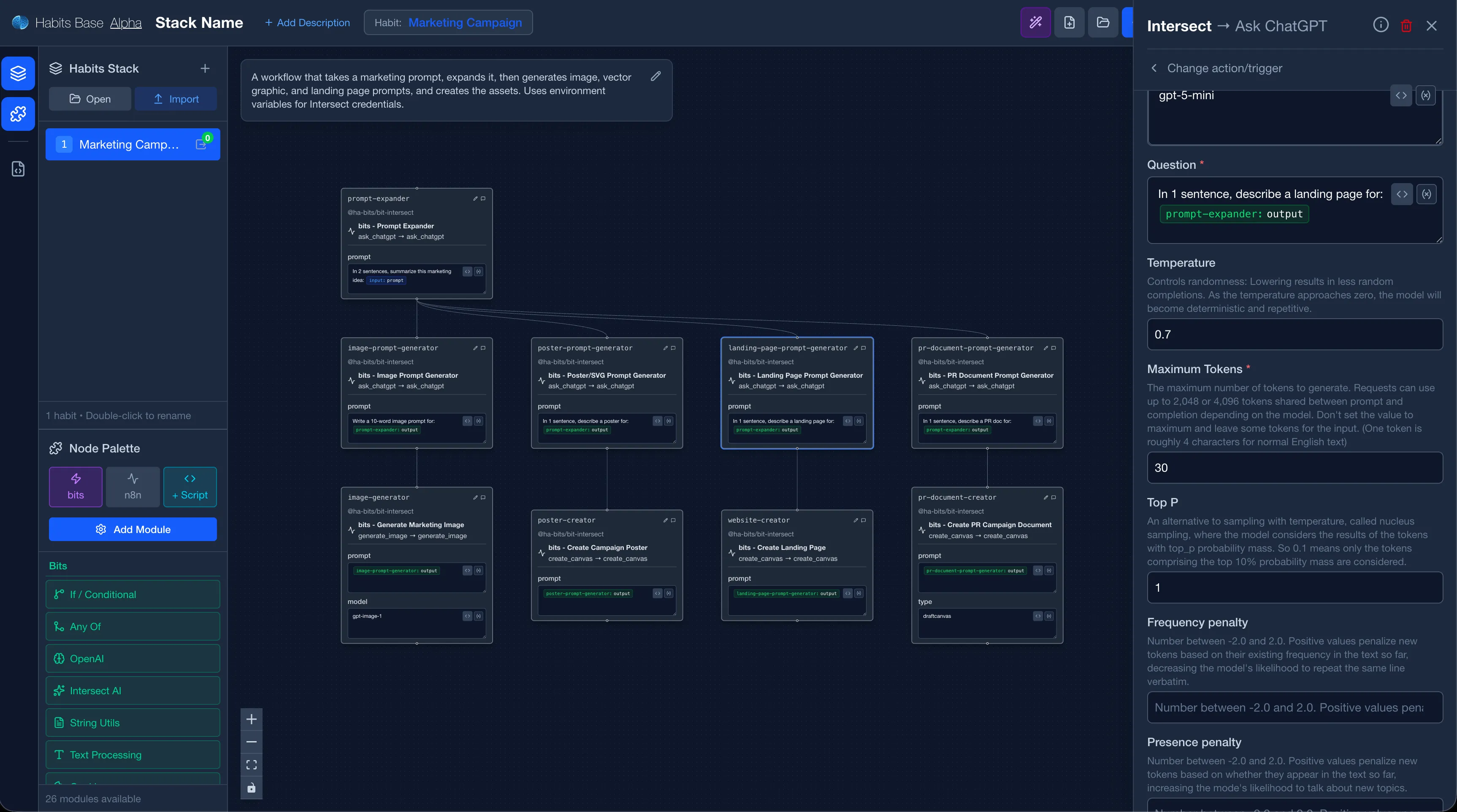
Base is the visual drag-and-drop editor for building habits. It runs in the browser and lets you design, test, and export workflows without writing YAML by hand.
What it is
| Capability | Description |
|---|---|
| Visual editor | Connect bits with a node graph UI |
| YAML export | Export any workflow to version-controlled .habit or stack.yaml and multiple habits .yaml files |
| Template library | Browse and import community habits |
| Module manager | Install and manage bits available in your workspace |
| Binary export | Pack a habit into a standalone executable or app |
| Mirror | Send/receive habits to other devices via P2P (Mirror) |
How to run Base
npx habits baseBase starts at http://localhost:3000/habits/base/ by default.
WARNING
Base exposes module installation and code execution endpoints. Do not expose it publicly on a production server.
Key workflows
- Build a habit, Creating Habits
- Run a habit, Running Habits (Cortex)
- Pack and ship, Packing and Distributing
- Explore variables, Evaluating Variables
Environment Variables
Configure Base by setting these variables before starting the server (inline, in a .env file in the working directory, or via the Admin panel service settings).
Opt-in features (disabled by default)
| Variable | Default | Description |
|---|---|---|
HABITS_ALLOW_SERVE | false | Set to true to allow running habits directly from the Base UI. Spawns a Cortex subprocess. Keep false on shared/public instances. |
Security controls (enabled by default)
| Variable | Default | Description |
|---|---|---|
HABITS_ALLOW_EXECUTE | true | Set to false to disable the workflow execution endpoint (POST /api/execute). |
HABITS_ALLOW_MODULES_INSTALL | true | Set to false to disable module installation endpoints. |
HABITS_ALLOW_EXPORT | true | Set to false to disable binary/app export endpoints. |
HABITS_ALLOW_FORMS_AUTH | true | Set to false to disable forms authentication endpoints. |
HABITS_ALLOW_SECURITY_API | true | Set to false to disable security disclosure endpoints. |
Server configuration
| Variable | Default | Description |
|---|---|---|
HABITS_CORS_ORIGINS | * | Comma-separated list of allowed CORS origins. Set to your domain in production (e.g. https://your-domain.com). |
HABITS_BODY_LIMIT_MB | 1000 | Maximum JSON body size in MB. Lower this (e.g. 10) on public-facing instances. |
AI generation
| Variable | Required | Description |
|---|---|---|
CLAUDE_API_KEY | No | Your Anthropic API key (sk-ant-...). Pre-configures AI generation for all users. If omitted, users can enter their own key in the Generate modal. |
HABITS_AI_DEBUG | No | Set to true to keep temporary staging directories on disk after generation. Useful for debugging generated files. |
HABITS_REF_PATH | No | Path to reference materials (bits and example habits). Defaults to ~/.habits/reference. |
Example: enabling serve and AI generation
HABITS_ALLOW_SERVE=true CLAUDE_API_KEY=sk-ant-... npx habits@latest baseOr add them to a .env file in the same directory:
HABITS_ALLOW_SERVE=true
CLAUDE_API_KEY=sk-ant-...For public/shared instances see the hardening guide for recommended settings.
Setting environment variables via the Admin panel
When Base is running as a managed service inside Admin, you configure its environment variables through the Admin UI instead of the command line.
- Open the Admin UI.
- Go to Services and find your Base service instance.
- Click the service to open its settings.
- Locate the Environment Variables section and add the key-value pairs you need (e.g.
HABITS_ALLOW_SERVE=true). - Save and restart the service. Admin will pass the variables to the Base process on startup.
This is the recommended approach when running Base in a multi-service deployment, as it keeps configuration centralised and avoids editing files on the server directly.
Relation to other tools
| Tool | Relation |
|---|---|
| Cortex Server | Base exports YAML; Cortex runs it |
| Admin | Admin can host a Base instance as a managed service |
| Mirror | Base toolbar includes a Mirror button to send habits P2P |