
Email Drafts
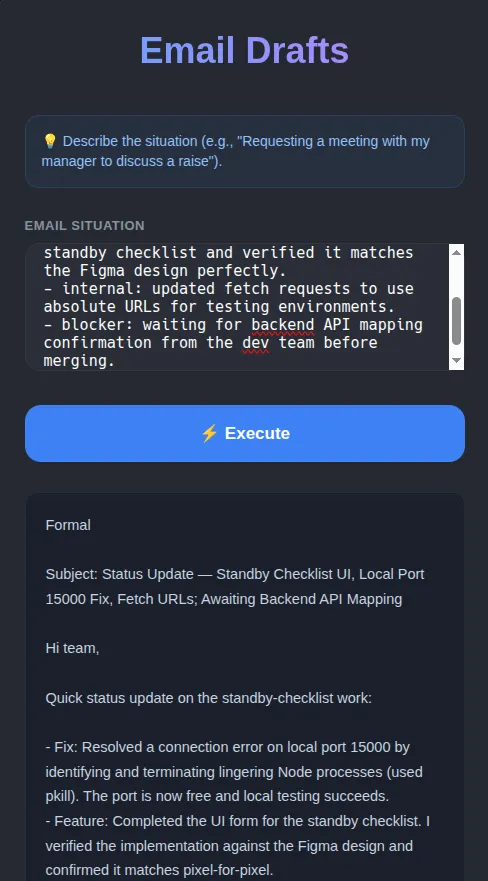
Click to zoom
Email Drafts
Convert any rough situation or text description into a professional email draft instantly.
- This habit is designed to help you write professional emails on the fly. You just need to describe the situation in plain English (e.g., explaining a server crash or requesting a meeting).
- The AI will automatically draft a structured, clean, and professional email. The output is displayed using custom HTML templates that ensure the text is aligned properly from left to right (LTR) for flawless reading.
Run Your .habit File
Run on Mobile
- [ ] Download the Cortex App from store or the downloads page
- [ ] Open the Cortex App on your device
- [ ] Tap "Open Habit" or "+" button
- [ ] Select your
.habitfile from your device storage - [ ] The habit will be loaded and ready to run
Run on Desktop
- [ ] Download the Cortex App for your platform from the downloads page
- [ ] Install and open the Cortex App
- [ ] Click "Open Habit" or drag & drop your
.habitfile - [ ] The habit will be loaded and ready to run
- [ ] Optional: Place a
.envfile in the same directory as your.habitfile to override environment variables
Run on Server
Run your .habit file as a server using the Cortex CLI:
bash
# Install and run in one command
npx @ha-bits/cortex --config ./your-app.habit- [ ] Make sure Node.js 20+ is installed
- [ ] Run the command above with your
.habitfile path - [ ] Server will start on the specified port (default: 3000)
- [ ] Access the app at
http://localhost:3000 - [ ] Optional: Place a
.envfile next to your.habitfile - it will automatically override any embedded environment variables
Run Serverless
For serverless or containerized deployments, we recommend using Docker:
bash
# Using Docker (recommended for serverless)
docker run -p 3000:3000 -v $(pwd)/your-app.habit:/app/habit.habit \
  node:20-alpine npx @ha-bits/cortex --config /app/habit.habit --host 0.0.0.0
Or create a Dockerfile:
dockerfile
FROM node:20-alpine
WORKDIR /app
COPY your-app.habit ./
COPY .env ./ # Optional: include environment variables
RUN npm install -g @ha-bits/cortex
EXPOSE 3000
CMD ["cortex", "--config", "./your-app.habit", "--host", "0.0.0.0"]- [ ] Create a Dockerfile or use the Docker run command above
- [ ] Deploy to your preferred cloud provider (AWS, GCP, Azure, etc.)
- [ ] Configure environment variables via your cloud provider's secrets management
- [ ] Set up health checks at
/habits/base/apiendpoint
Workflow Visualization
Requirements
- OpenAI API key (gpt-5-mini)
Quick Start
Run using the Habits CLI wrapper, recommended if you develop local Habits
# First, download the example files
npx habits@latest cortex --config ./email-drafts/stack.yamlGet in touch
Want this habit running in your environment?
This habit is a starting point. Tell us about your stack and we'll help you get it working exactly the way your team needs.