
Importing Workflows from n8n and Activepieces
This guide explains how to import existing workflows from n8n and Activepieces into Habits. You can import workflows using either the GUI (Base) or the CLI.
Overview
Habits provides built-in converters that automatically detect and transform workflows from popular automation platforms.
Note: n8n workflow importing is currently experimental. While basic workflows convert successfully, complex workflows with advanced n8n-specific features may require manual adjustments after import. Activepieces importing is fully supported.
The converter handles:
- Node/action mapping to Habits format
- Connection/edge preservation
- Credential extraction (as environment variable references)
- Position data for visual layout
Exporting Workflows from Source Platforms
Exporting from n8n
- Open your workflow in n8n
- Click the ⋮ (three dots) menu or right-click the canvas
- Select Download
- Save the JSON file to your local machine
The exported file will have a structure like:
{
  "name": "My Workflow",
  "nodes": [
    {
      "name": "HTTP Request",
      "type": "n8n-nodes-base.httpRequest",
      "position": [250, 300],
      "parameters": { ... }
    }
  ],
  "connections": {
    "HTTP Request": {
      "main": [[{ "node": "Next Node", "type": "main", "index": 0 }]]
    }
  }
}
Exporting from Activepieces
- Open your flow in Activepieces
- Click the ⋮ menu in the top toolbar
- Select Export Flow
- Save the JSON file to your local machine
The exported file will have a structure like:
{
  "displayName": "My Flow",
  "trigger": {
    "name": "trigger",
    "type": "PIECE_TRIGGER",
    "settings": {
      "pieceName": "@activepieces/piece-forms",
      "triggerName": "form_submission"
    },
    "nextAction": { ... }
  }
}
Importing via GUI (Base)
The Base visual builder provides an intuitive way to import and convert workflows.
Prerequisites
Start the Base server:
# Development mode
pnpm nx dev @ha-bits/base

# Or using npx
npx habits edit
Access Base at: http://localhost:3001
Import Steps
Open Base UI - Navigate to http://localhost:3001 in your browser
Click "Import & Convert" - In the toolbar, click the button with the refresh icon labeled Import & Convert
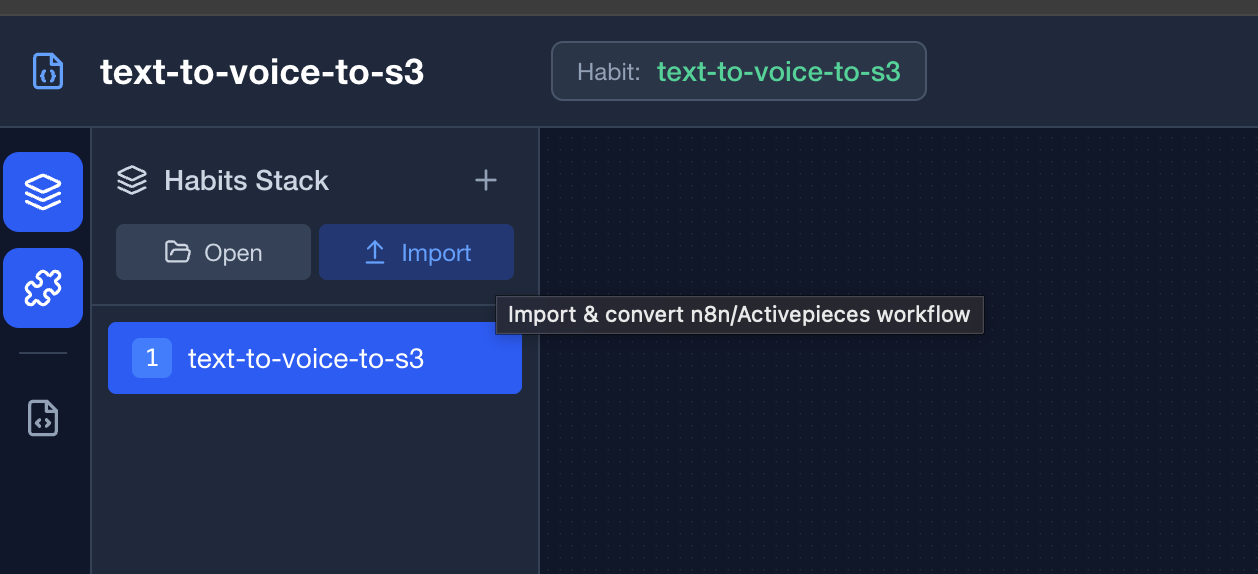 The Import & Convert button in the Base toolbar
Select your workflow file - Choose the exported JSON file from n8n or Activepieces
Automatic Detection - Habits automatically detects the workflow format:
- n8n workflows are identified by their
nodesandconnectionsstructure - Activepieces workflows are identified by their
triggeranddisplayNamefields
- n8n workflows are identified by their
Review the converted workflow - The workflow appears on the canvas with:
- Connections between nodes preserved
- Parameters mapped to Habits format
Handle credentials - If the workflow contains credential references, you'll see a notification about extracted connections. Click Publish to view and export the
.envfile template.
Loading Native Habits Workflows
For workflows already in Habits format, use the Load button instead:
- Click Convert in the toolbar
- Select your
.jsonfile - The workflow loads directly without conversion
Importing via CLI
The CLI provides a powerful way to batch convert workflows and integrate with automation pipelines.
Basic Conversion
# Convert an n8n workflow
habits convert --input ./n8n-workflow.json --output ./habits-workflow.json

# Convert an Activepieces workflow
habits convert --input ./activepieces-flow.json --output ./habits-workflow.json
With Environment File Generation
Generate a .env template file containing all credential references:
habits convert --input ./workflow.json --output ./habits.json --envThis creates two files:
habits.json- The converted workflowhabits.env- Environment variable template for credentials
Example .env output:
# Environment variables for My Workflow
# Generated from workflow conversion

# Credentials
SLACK_API_TOKEN=your_slack_api_token_here
OPENAI_API_KEY=your_openai_api_key_here
CLI Options
| Option | Alias | Description | Required |
|---|---|---|---|
--input | -i | Path to input workflow JSON file | Yes |
--output | -o | Path to output file (prints to stdout if omitted) | No |
--env | -e | Generate .env file for credentials | No |
--pretty | Pretty print JSON output (default: true) | No |
Examples
Convert and print to stdout:
habits convert --input ./n8n-export.jsonConvert with custom output path:
habits convert -i ./activepieces-flow.json -o ./converted/my-habit.jsonFull conversion with environment template:
habits convert \
  --input ./exports/production-workflow.json \
  --output ./habits/production.json \
  --env
Pipe output to another command:
habits convert --input ./workflow.json --no-pretty | jq '.nodes | length'Understanding the Conversion
What Gets Converted
| Component | n8n | Activepieces | Notes |
|---|---|---|---|
| Nodes/Actions | Mapped to Habits node format | ||
| Triggers | Converted to trigger nodes | ||
| Connections | Preserved as edges | ||
| Parameters | Mapped to params object | ||
| Credentials | Extracted as env var references |
= Experimental support (n8n)
Node Mapping
n8n nodes are mapped using:
type→module(e.g.,n8n-nodes-base.httpRequest→n8n-nodes-base)parameters→paramsposition→position
Activepieces actions are mapped using:
settings.pieceName→modulesettings.actionName→operationsettings.input→params
Credential Handling
Credentials are never stored in plain text in workflows. Instead, they're converted to environment variable references:
{
  "params": {
    "apiKey": "{{habits.env.OPENAI_API_KEY}}"
  }
}
Use the --env flag to generate a template file for these variables.
Post-Import Steps
After importing a workflow:
1. Review and Adjust Nodes
- Check that all nodes were converted correctly
- Verify parameter mappings
- Adjust positions if needed for better readability
2. Configure Credentials
- Copy the generated
.envfile to your project root - Fill in the actual credential values
- Ensure the
.envfile is in your.gitignore
3. Test the Workflow
# Start the server
habits server --config ./stack.yaml

# Or execute directly
habits execute ./habits-workflow.json
4. Save and Export
From the GUI:
- Click Save to download the Habits workflow
- Click Publish to see deployment options
Troubleshooting
"Unknown workflow format" Error
Cause: The converter couldn't detect the workflow type.
Solutions:
- Ensure the file is valid JSON
- Verify it's an export from n8n or Activepieces (not a screenshot or partial export)
- Check the file structure matches expected formats
Missing Nodes After Import
Cause: Some custom or community nodes may not have direct mappings.
Solutions:
- Check the console for conversion warnings
- Manually configure unmapped nodes in Base
- Consider using the HTTP Request node as a fallback for API integrations
Credential Reference Errors
Cause: Environment variables not set or misconfigured.
Solutions:
- Ensure
.envfile exists in your project root - Verify variable names match exactly (case-sensitive)
- Restart the server after updating
.env
Sample Workflows
The exports/ directory contains example workflows for testing:
| File | Source | Description |
|---|---|---|
| n8n-webhook-to-text-workflow.json | Habits | Webhook to text processing |
| Activepieces-HTTP-to-Text-Processing-Workflow-workflow.json | Activepieces | HTTP to text processing |
| HTTP-to-Text-Processing-Workflow-workflow.json | n8n | HTTP request workflow |
Try importing these to see the converter in action:
# CLI example
habits convert --input ./exports/Activepieces-HTTP-to-Text-Processing-Workflow-workflow.json --output ./test-import.json --env
Next Steps
- Creating and Editing Habits - Learn to build workflows visually
- Running Automations - Execute and monitor your workflows
- Habit Schema - Understand the workflow data structure