
Creating Habits
This guide covers all the ways to create habits: writing YAML/JSON directly (Habit as Code) or using the visual Base editor.
Option #1: HaC/WaC/AaC: Habit as Code
The most powerful way to create habits is writing them directly as YAML or JSON files. This approach, called Habit as Code (HaC), Workflow as Code (WaC) or Automation as Code (AaC), gives you:
- Version control - Track changes with Git, review PRs, rollback easily
- Reproducibility - Same config always produces same behavior
- Templating - Use environment variables and dynamic values
- CI/CD integration - Deploy habits through your existing pipelines
Quick Start: Your First WaC Habit
id: hello-world
name: Hello World Demo
description: A simple hello world habit using @ha-bits/bit-hello-world

# This habit demonstrates the bit-hello-world module:
# - Returns "hello there" when param1="hello" and param2="world"
# - Returns "Nah!" otherwise

input:
  - name: param1
    type: string
    displayAs: text
    label: First Parameter
    description: Enter the first word (use "hello" for greeting)
    default: hello
    required: true

  - name: param2
    type: string
    displayAs: text
    label: Second Parameter
    description: Enter the second word (use "world" for greeting)
    default: world
    required: true

nodes:
  - id: say-hello
    type: action
    data:
      framework: bits
      source: npm
      module: "@ha-bits/bit-hello-world"
      operation: greet
      params:
        param1: "{{habits.input.param1}}"
        param2: "{{habits.input.param2}}"

edges: []

output:
  greeting:
    value: "{{say-hello}}"
    type: string
    displayAs: text
label: Greetingversion: "1.0"
name: "Hello World"
workflows:
- id: hello-world
path: ./habit.yaml
enabled: true
- id: hello-world-env
path: ./habit-env.yaml
enabled: true
server:
port: 13000
host: "0.0.0.0"
frontend: ./frontend
logging:
level: info
outputs: [console]
format: text
colorize: trueRun it:
npx habits cortex --config stack.yamlTest it:
curl http://localhost:13000/api/hello-worldKey WaC Concepts
| Concept | Description |
|---|---|
workflows | Array of automation workflows or paths to workflow files |
nodes | Sequential steps in the workflow |
inputs | Input parameters with types and defaults |
params | Configuration for each node using {{habits.input.x}} syntax |
Using Environment Variables
Reference secrets and config without hardcoding:
Authorization: "Bearer {{habits.env.API_TOKEN}}"Then set in your environment:
export API_TOKEN=secret123For more details on the schema, see the Habit Schema reference.
Option #2: Visual Builder: Base UI
Base is the visual builder component that allows you to construct habits from individual bits. It provides an intuitive interface for designing automation workflows without writing code.
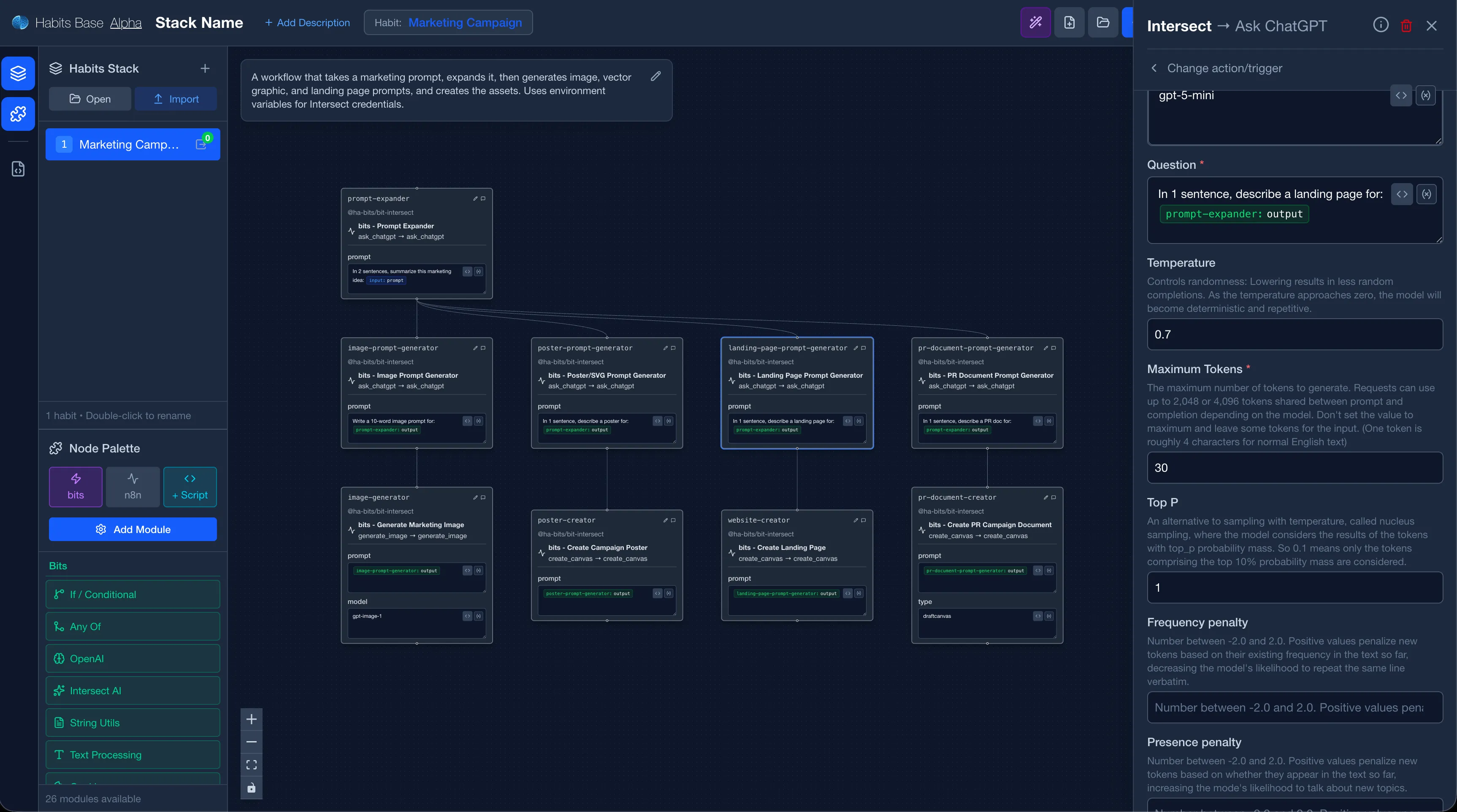
Getting Started with Base
Prerequisites
- Node.js 18 or higher
- pnpm (recommended) or npm
- Git
Running Base
# Option #1: Run base using habits if installed globally
habits base

# Option #2: Run base using npx
npx habits base

# Option #3: Start the Base UI (development mode), after cloning code
pnpm nx dev @ha-bits/base
Access Points
| Endpoint | URL | Description |
|---|---|---|
| Base UI | http://localhost:3001 | Visual Workflow Builder |
| Base API | http://localhost:3001/api (Proxied to http://localhost:3000) | REST API Backend |
Accessing Base
To access the Base builder:
- Navigate to http://localhost:3001 in your browser
- You'll be presented with the habit builder interface
Creating a New Habit
Step 1: Start a New Habit
Click the "Reset" button to create a fresh automation workflow.
Step 2: Add Bits to Your Habit
Bits are the individual nodes that make up your habit. Each bit represents a single action or step in your automation.
- Browse the available bits in the sidebar
- Drag and drop bits onto the canvas
- Connect bits together to define the flow
Step 3: Configure Each Bit
Click on any bit to configure its settings:
- Select Doer: Each bit can have multiple Doers/Actions and Watchers/Triggers.
- Input parameters: Define what data the bit receives
- Output mapping: Specify how the bit's output is used
- Credentials: Set up authentication if required
Step 4: Connect Bits Together
Create connections between bits to define the execution flow:
- Click on a bit's output handle
- Drag to another bit's input handle
- Release to create the connection
Editing Existing Habits
Opening a Habit for Editing
- Navigate to your habits list
- Click on the habit you want to edit
- The habit will open in the Base editor
Modifying Bits
- Edit: Click on a bit to modify its configuration
- Delete: Select a bit and press Delete or use the context menu
- Move: Drag bits to reposition them on the canvas
- Delete Edge: Click on a connection and press Delete
- Reroute Edge: Delete the existing connection and create a new one
Creating Frontend
You can use base also to edit UI of the habit by clicking the UI button. This is still experimental.
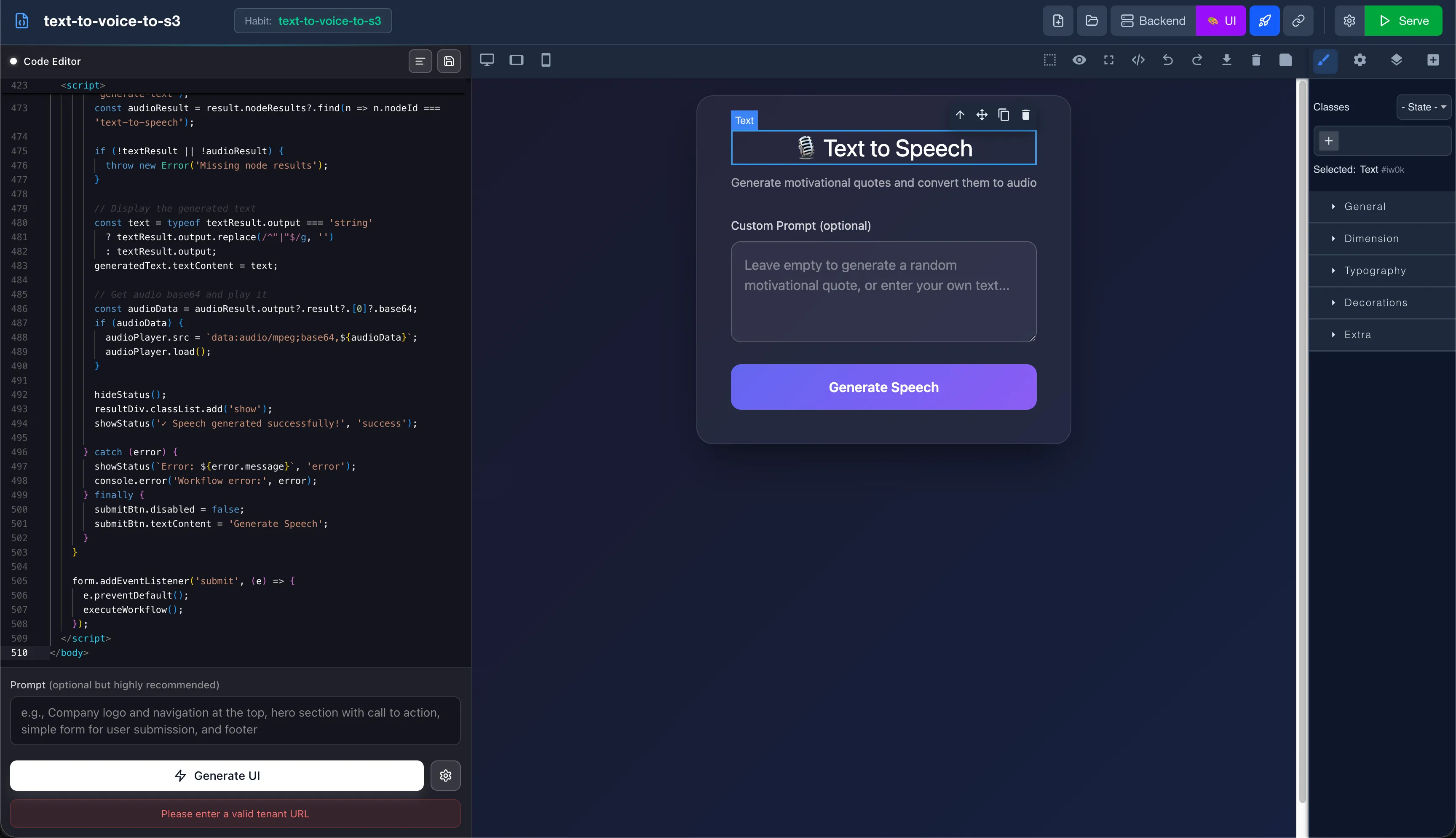 Habits Base UI Editor - Automation Frontend Builder
You can use AI to directly generate a UI that can work with the logic. Use Intersect for best results, if not possible, use Anthropic Opus or Gemini Pro models.
Best Practices
- Start Simple: Begin with small habits and gradually add complexity
- Name Your Bits: Use descriptive names to make your habit readable
- Test Incrementally: Test each bit as you add it to catch issues early
- Document Your Habits: Add comments or descriptions to explain the workflow purpose
Troubleshooting
Common Issues
| Issue | Solution |
|---|---|
| Bits not connecting | Ensure you're connecting output to input handles |
| Configuration not saving | Check for validation errors in the bit settings |
| Habit not appearing in list | Refresh the page and try saving again |
Next Steps
Once you've created your habit, learn how to run it using Cortex in the Running Automations guide.