
Build Your First Full App with Habits
This guide walks you through building a complete AI-powered application, the Resume Analyzer, from understanding the workflows to packaging for distribution across all platforms: Android, iOS, macOS, Windows, and Linux.
Complete Example
This tutorial uses the Resume Analyzer showcase, a ready-to-use app with multiple AI workflows, a mobile-first frontend, and local database storage.
Environment Setup Checklist
Install Node Version Manager (nvm)
- [ ] macOS/Linux: Install nvm:
curl -o- https://raw.githubusercontent.com/nvm-sh/nvm/v0.40.1/install.sh | bash - [ ] Windows: Use nvm-windows or download Node.js directly from nodejs.org
- [ ] Restart terminal or run:
source ~/.bashrc(or~/.zshrc) - [ ] Verify nvm:
nvm --version
Install Node.js 24
- [ ] Install Node.js 24:
nvm install 24 - [ ] Set as default:
nvm alias default 24 - [ ] Verify Node.js:
node --version(should show v24.x.x)
What You'll Build
The Resume Analyzer demonstrates building a multi-habit application with:
- 4 AI-powered workflows — Analyze resumes, generate cover letters, list history, retrieve saved analyses
- OpenAI Vision integration — Extract text from resume images
- Local database storage — PouchDB for storing analyses without external dependencies
- Mobile-first frontend — Responsive UI ready for packaging as native app
Workflow Visualization
Explore the 4 habits that power the Resume Analyzer:
Source Files
version: "1.0"
name: "Resume Analyzer"

workflows:
  - id: analyze-resume
    path: ./habits/analyze-resume.yaml
    enabled: true

  - id: generate-cover-letter
    path: ./habits/generate-cover-letter.yaml
    enabled: true

  - id: list-analyses
    path: ./habits/list-analyses.yaml
    enabled: true

  - id: get-analysis
    path: ./habits/get-analysis.yaml
    enabled: true

server:
  port: 13000
  host: "0.0.0.0"
  frontend: frontend
  openapi: true

logging:
  level: info
  outputs: [console]
  format: text
colorize: trueid: analyze-resume
name: Analyze Resume
description: Analyze resume image against job description and provide improvement suggestions using SQL storage
input:
- id: resumeImage
type: string
required: true
description: Resume image content (base64 encoded PNG/JPG/WebP)
- id: jobDescription
type: string
required: false
description: Target job description
- id: targetRole
type: string
required: false
description: Target job title/role
nodes:
# Extract text from image using OpenAI Vision
- id: extract-text
type: bits
data:
framework: bits
source: npm
module: "@ha-bits/bit-openai"
operation: vision_prompt
credentials:
openai:
apiKey: "{{habits.env.OPENAI_API_KEY}}"
params:
image: "{{habits.input.resumeImage}}"
temperature: 0.1
maxTokens: 4000
prompt: |
Extract all text content from this resume image.
Return ONLY the extracted text content, preserving the structure and formatting as plain text.
Include all sections: contact info, summary, experience, education, skills, certifications.
# Parse and structure resume
- id: parse-resume
type: bits
data:
framework: bits
source: npm
module: "@ha-bits/bit-openai"
operation: ask_chatgpt
credentials:
openai:
apiKey: "{{habits.env.OPENAI_API_KEY}}"
params:
model: gpt-4o
temperature: 0.3
maxTokens: 1000
cast: true
prompt: |
Parse this resume and extract structured information:
{{extract-text}}
Return JSON:
{
"name": "Full name",
"email": "Email",
"phone": "Phone",
"location": "Location",
"summary": "Professional summary",
"experience": [{"title": "", "company": "", "dates": "", "bullets": []}],
"education": [{"degree": "", "school": "", "year": ""}],
"skills": ["skill1", "skill2"],
"certifications": [],
"yearsExperience": number
}
# Score ATS compatibility
- id: ats-score
type: bits
data:
framework: bits
source: npm
module: "@ha-bits/bit-openai"
operation: ask_chatgpt
credentials:
openai:
apiKey: "{{habits.env.OPENAI_API_KEY}}"
params:
model: gpt-4o
temperature: 0.4
maxTokens: 600
cast: 'force'
prompt: |
Analyze this resume for ATS (Applicant Tracking System) compatibility:
Resume: {{extract-text}}
Target Job: {{habits.input.jobDescription}}
Evaluate:
1. Keyword optimization (does it include relevant keywords?)
2. Format compatibility (is it ATS-friendly?)
3. Contact info completeness
4. Section structure
5. Quantifiable achievements
Return JSON:
{
"overallScore": number (0-100),
"keywordScore": number (0-100),
"formatScore": number (0-100),
"contentScore": number (0-100),
"missingKeywords": ["keyword1", "keyword2"],
"formatIssues": ["issue1", "issue2"],
"suggestions": ["suggestion1", "suggestion2"]
}
# Analyze experience quality
- id: experience-analysis
type: bits
data:
framework: bits
source: npm
module: "@ha-bits/bit-openai"
operation: ask_chatgpt
credentials:
openai:
apiKey: "{{habits.env.OPENAI_API_KEY}}"
params:
model: gpt-4o
temperature: 0.5
maxTokens: 800
prompt: |
Analyze the work experience section of this resume:
{{extract-text}}
For each position, evaluate:
1. Action verbs usage
2. Quantifiable results (numbers, percentages)
3. Achievement vs. responsibility focus
4. Relevance to target role: {{habits.input.targetRole}}
Provide:
- Strengths of each position description
- Weaknesses and areas to improve
- Specific rewrite suggestions for 2-3 weak bullets
- Example of how to add metrics where missing
# Job match analysis
- id: job-match
type: bits
data:
framework: bits
source: npm
module: "@ha-bits/bit-openai"
operation: ask_chatgpt
credentials:
openai:
apiKey: "{{habits.env.OPENAI_API_KEY}}"
params:
model: gpt-4o
temperature: 0.4
maxTokens: 700
cast: true
prompt: |
Compare this resume to the job requirements:
Resume: {{extract-text}}
Job Description: {{habits.input.jobDescription}}
Target Role: {{habits.input.targetRole}}
Return JSON:
{
"matchScore": number (0-100),
"matchingSkills": ["skill1", "skill2"],
"missingSkills": ["skill1", "skill2"],
"experienceGaps": ["gap1", "gap2"],
"strengthsForRole": ["strength1", "strength2"],
"recommendations": ["rec1", "rec2"],
"likelyOutcome": "Strong match / Moderate match / Weak match"
}
# Generate improved summary
- id: generate-summary
type: bits
data:
framework: bits
source: npm
module: "@ha-bits/bit-openai"
operation: ask_chatgpt
credentials:
openai:
apiKey: "{{habits.env.OPENAI_API_KEY}}"
params:
model: gpt-4o
temperature: 0.7
maxTokens: 300
roles:
- role: system
content: You are an expert resume writer who crafts compelling professional summaries.
prompt: |
Write an improved professional summary for this resume:
Current Resume: {{extract-text}}
Target Role: {{habits.input.targetRole}}
Create a 3-4 sentence summary that:
- Opens with years of experience and specialty
- Highlights 2-3 key achievements
- Includes relevant skills for the target role
- Shows unique value proposition
# Interview questions to prepare
- id: interview-prep
type: bits
data:
framework: bits
source: npm
module: "@ha-bits/bit-openai"
operation: ask_chatgpt
credentials:
openai:
apiKey: "{{habits.env.OPENAI_API_KEY}}"
params:
model: gpt-4o
temperature: 0.6
maxTokens: 600
prompt: |
Based on this resume and job, generate interview preparation:
Resume: {{extract-text}}
Job: {{habits.input.jobDescription}}
Role: {{habits.input.targetRole}}
Provide:
1. 5 likely interview questions based on resume gaps
2. 3 behavioral questions (STAR format prep)
3. 3 technical questions based on listed skills
4. Suggested talking points for strengths
5. How to address any weaknesses/gaps
# Convert experience analysis markdown to HTML
- id: experience-analysis-html
type: bits
data:
framework: bits
source: npm
module: "@ha-bits/bit-markdown-to-html"
operation: toHtml
params:
markdown: "{{experience-analysis}}"
# Convert improved summary markdown to HTML
- id: generate-summary-html
type: bits
data:
framework: bits
source: npm
module: "@ha-bits/bit-markdown-to-html"
operation: toHtml
params:
markdown: "{{generate-summary}}"
# Convert interview prep markdown to HTML
- id: interview-prep-html
type: bits
data:
framework: bits
source: npm
module: "@ha-bits/bit-markdown-to-html"
operation: toHtml
params:
markdown: "{{interview-prep}}"
# Save analysis document using SQL database
- id: save-analysis
type: bits
data:
framework: bits
source: npm
module: "@ha-bits/bit-database-sql"
operation: insert
params:
collection: "resume_analyses"
document:
targetRole: "{{habits.input.targetRole}}"
extractedText: "{{extract-text}}"
parsed: "{{parse-resume}}"
atsScore: "{{ats-score}}"
experienceAnalysis: "{{experience-analysis}}"
experienceAnalysisHtml: "{{experience-analysis-html}}"
jobMatch: "{{job-match}}"
improvedSummary: "{{generate-summary}}"
improvedSummaryHtml: "{{generate-summary-html}}"
interviewPrep: "{{interview-prep}}"
interviewPrepHtml: "{{interview-prep-html}}"
hasAttachment: true
edges:
- source: extract-text
target: parse-resume
- source: parse-resume
target: ats-score
- source: parse-resume
target: experience-analysis
- source: parse-resume
target: job-match
- source: parse-resume
target: generate-summary
- source: job-match
target: interview-prep
# Connect markdown nodes to HTML converters
- source: experience-analysis
target: experience-analysis-html
- source: generate-summary
target: generate-summary-html
- source: interview-prep
target: interview-prep-html
# Connect all analysis nodes to save-analysis
- source: ats-score
target: save-analysis
- source: experience-analysis-html
target: save-analysis
- source: generate-summary-html
target: save-analysis
- source: interview-prep-html
target: save-analysis
output:
id: "{{save-analysis.id}}"
extractedText: "{{extract-text}}"
parsed: "{{parse-resume}}"
atsScore: "{{ats-score}}"
experienceAnalysis: "{{experience-analysis}}"
experienceAnalysisHtml: "{{experience-analysis-html}}"
jobMatch: "{{job-match}}"
improvedSummary: "{{generate-summary}}"
improvedSummaryHtml: "{{generate-summary-html}}"
interviewPrep: "{{interview-prep}}"
interviewPrepHtml: "{{interview-prep-html}}"id: generate-cover-letter
name: Generate Cover Letter
description: Generate a customized cover letter for a specific job
input:
- id: resumeImage
type: string
required: true
description: Resume image content (base64 encoded PNG/JPG/WebP)
- id: jobDescription
type: string
required: true
description: Target job description
- id: companyName
type: string
required: true
description: Company name
- id: hiringManager
type: string
required: false
description: Hiring manager name if known
- id: tone
type: string
required: false
description: formal, friendly, enthusiastic
nodes:
# Extract text from image using OpenAI Vision
- id: extract-text
type: bits
data:
framework: bits
source: npm
module: "@ha-bits/bit-openai"
operation: vision_prompt
credentials:
openai:
apiKey: "{{habits.env.OPENAI_API_KEY}}"
params:
image: "{{habits.input.resumeImage}}"
temperature: 0.1
maxTokens: 4000
prompt: |
Extract all text content from this resume image.
Return ONLY the extracted text content, preserving the structure and formatting as plain text.
- id: generate-letter
type: bits
data:
framework: bits
source: npm
module: "@ha-bits/bit-openai"
operation: ask_chatgpt
credentials:
openai:
apiKey: "{{habits.env.OPENAI_API_KEY}}"
params:
model: gpt-4o
temperature: 0.7
maxTokens: 800
roles:
- role: system
content: You are an expert cover letter writer who crafts compelling, personalized letters that get interviews.
prompt: |
Write a cover letter for this application:
Resume:
{{extract-text}}
Job Description:
{{habits.input.jobDescription}}
Company: {{habits.input.companyName}}
Hiring Manager: {{habits.input.hiringManager}}
Tone: {{habits.input.tone}}
Structure:
1. Opening hook that shows enthusiasm and mentions the specific role
2. Paragraph connecting your experience to their needs (use specific examples)
3. Paragraph showing knowledge of the company and cultural fit
4. Strong closing with call to action
Keep it to about 300-350 words. Be specific, not generic.
edges:
- source: extract-text
target: generate-letter
output:
coverLetter: "{{generate-letter}}"
extractedText: "{{extract-text}}"id: list-analyses
name: List Analyses
description: Get all resume analyses from SQL database
input:
- id: limit
type: number
required: false
default: 100
nodes:
- id: query-analyses
type: bits
data:
framework: bits
source: npm
module: "@ha-bits/bit-database-sql"
operation: query
params:
collection: "resume_analyses"
limit: "{{habits.input.limit}}"
edges: []
output:
analyses: "{{query-analyses.results}}"id: get-analysis
name: Get Analysis
description: Get a specific resume analysis with optional attachment
input:
- id: id
type: string
required: true
- id: includeAttachment
type: boolean
required: false
description: Whether to include the resume image attachment
nodes:
- id: fetch-analysis
type: bits
data:
framework: bits
source: npm
module: "@ha-bits/bit-database-sql"
operation: query
params:
collection: "resume_analyses"
filter:
_id: "{{habits.input.id}}"
limit: 1
edges:
- source: fetch-analysis
target: fetch-attachment
output:
analysis: "{{fetch-analysis.results.0}}"
attachment: "{{fetch-attachment.content}}"<!DOCTYPE html>
<html lang="en">
<head>
<meta charset="UTF-8">
<meta name="viewport" content="width=device-width, initial-scale=1.0, maximum-scale=1.0, user-scalable=no, viewport-fit=cover">
<meta name="apple-mobile-web-app-capable" content="yes">
<meta name="apple-mobile-web-app-status-bar-style" content="black-translucent">
<meta name="theme-color" content="#1a1a1a">
<title>Resume Analyzer</title>
<style>
:root {
--safe-top: env(safe-area-inset-top, 0px);
--safe-bottom: env(safe-area-inset-bottom, 0px);
--primary: #3b82f6;
--primary-dark: #2563eb;
--success: #10b981;
--warning: #f59e0b;
--danger: #ef4444;
--bg-dark: #1a1a1a;
--bg-card: #2a2a2a;
--text-primary: #ffffff;
--text-secondary: rgba(255,255,255,0.7);
--text-muted: rgba(255,255,255,0.5);
}
* {
box-sizing: border-box;
margin: 0;
padding: 0;
-webkit-tap-highlight-color: transparent;
-webkit-touch-callout: none;
}
html, body {
height: 100%;
overflow: hidden;
}
body {
font-family: -apple-system, BlinkMacSystemFont, 'SF Pro Display', 'Segoe UI', Roboto, sans-serif;
background: #1a1a1a;
color: var(--text-primary);
font-size: 16px;
line-height: 1.5;
}
/* App Container */
.app {
display: flex;
flex-direction: column;
height: 100%;
padding-top: var(--safe-top);
padding-bottom: var(--safe-bottom);
}
/* App Header */
.app-header {
flex-shrink: 0;
padding: 16px 20px;
background: #222222;
border-bottom: 1px solid rgba(255,255,255,0.1);
position: relative;
z-index: 100;
}
.app-header h1 {
font-size: 1.5rem;
font-weight: 700;
text-align: center;
}
.header-back {
position: absolute;
left: 16px;
top: 50%;
transform: translateY(-50%);
background: none;
border: none;
color: var(--primary);
font-size: 1rem;
padding: 8px;
cursor: pointer;
display: none;
}
.header-back.visible { display: block; }
.header-action {
position: absolute;
right: 16px;
top: 50%;
transform: translateY(-50%);
background: none;
border: none;
color: var(--primary);
font-size: 1.2rem;
padding: 8px;
cursor: pointer;
display: none;
}
.header-action.visible { display: block; }
/* App Content */
.app-content {
flex: 1;
overflow-y: auto;
overflow-x: hidden;
-webkit-overflow-scrolling: touch;
scroll-behavior: smooth;
}
/* Screens */
.screen {
display: none;
min-height: 100%;
padding: 20px;
animation: fadeIn 0.3s ease;
}
.screen.active { display: block; }
@keyframes fadeIn {
from { opacity: 0; transform: translateY(10px); }
to { opacity: 1; transform: translateY(0); }
}
@keyframes slideUp {
from { opacity: 0; transform: translateY(100%); }
to { opacity: 1; transform: translateY(0); }
}
/* Cards */
.card {
background: var(--bg-card);
border: 1px solid rgba(255,255,255,0.1);
border-radius: 20px;
padding: 24px;
margin-bottom: 16px;
}
.card-title {
font-size: 1.1rem;
font-weight: 600;
color: var(--primary);
margin-bottom: 20px;
}
/* Form Elements */
.form-group {
margin-bottom: 20px;
}
.form-label {
display: block;
font-size: 0.9rem;
font-weight: 500;
color: var(--text-secondary);
margin-bottom: 10px;
}
.form-input {
width: 100%;
padding: 16px;
background: rgba(255,255,255,0.06);
border: 2px solid rgba(255,255,255,0.1);
border-radius: 14px;
font-size: 1rem;
color: var(--text-primary);
font-family: inherit;
transition: border-color 0.2s;
}
.form-input:focus {
outline: none;
border-color: var(--primary);
}
.form-input::placeholder { color: var(--text-muted); }
textarea.form-input {
resize: none;
min-height: 120px;
}
/* File Upload */
.upload-zone {
border: 2px dashed rgba(255,255,255,0.2);
border-radius: 20px;
padding: 40px 20px;
text-align: center;
transition: all 0.3s;
cursor: pointer;
}
.upload-zone.active {
border-color: var(--primary);
background: rgba(59, 130, 246, 0.1);
}
.upload-zone.has-file {
border-color: var(--success);
background: rgba(16, 185, 129, 0.1);
}
.upload-zone input { display: none; }
.upload-icon {
font-size: 3.5rem;
margin-bottom: 12px;
}
.upload-text {
font-size: 1rem;
color: var(--text-secondary);
}
.upload-filename {
margin-top: 12px;
font-weight: 600;
color: var(--success);
word-break: break-all;
}
/* Primary Button */
.btn-primary {
width: 100%;
padding: 18px 24px;
background: var(--primary);
border: none;
border-radius: 16px;
font-size: 1.1rem;
font-weight: 600;
color: white;
cursor: pointer;
transition: transform 0.2s, opacity 0.2s;
}
.btn-primary:active {
transform: scale(0.98);
}
.btn-primary:disabled {
opacity: 0.5;
cursor: not-allowed;
}
/* Score Ring */
.score-ring {
display: flex;
justify-content: center;
gap: 12px;
flex-wrap: wrap;
margin-bottom: 24px;
}
.score-item {
text-align: center;
flex: 1;
min-width: 70px;
padding: 16px 8px;
background: rgba(255,255,255,0.05);
border-radius: 16px;
}
.score-value {
font-size: 1.8rem;
font-weight: 700;
color: var(--primary);
}
.score-value.high { color: var(--success); }
.score-value.medium { color: var(--warning); }
.score-value.low { color: var(--danger); }
.score-label {
font-size: 0.75rem;
color: var(--text-muted);
margin-top: 4px;
}
/* Segment Control (Tabs) */
.segment-control {
display: flex;
background: rgba(255,255,255,0.06);
border-radius: 12px;
padding: 4px;
margin-bottom: 20px;
overflow-x: auto;
-webkit-overflow-scrolling: touch;
scrollbar-width: none;
}
.segment-control::-webkit-scrollbar { display: none; }
.segment-btn {
flex: 1;
min-width: max-content;
padding: 12px 16px;
background: transparent;
border: none;
border-radius: 10px;
font-size: 0.85rem;
font-weight: 500;
color: var(--text-secondary);
cursor: pointer;
transition: all 0.2s;
white-space: nowrap;
}
.segment-btn.active {
background: var(--primary);
color: white;
}
/* Tab Content */
.tab-panel {
display: none;
animation: fadeIn 0.3s ease;
}
.tab-panel.active { display: block; }
/* Content Section */
.content-section {
background: rgba(255,255,255,0.04);
border-radius: 16px;
padding: 20px;
margin-bottom: 16px;
}
.section-title {
font-size: 1rem;
font-weight: 600;
color: var(--primary);
margin-bottom: 12px;
}
.section-text {
font-size: 0.95rem;
line-height: 1.7;
color: var(--text-secondary);
white-space: pre-wrap;
}
/* Skills Tags */
.skills-row {
display: flex;
flex-wrap: wrap;
gap: 8px;
margin-bottom: 16px;
}
.skill-chip {
padding: 8px 14px;
border-radius: 20px;
font-size: 0.85rem;
font-weight: 500;
}
.skill-chip.match {
background: rgba(16, 185, 129, 0.2);
border: 1px solid var(--success);
color: var(--success);
}
.skill-chip.missing {
background: rgba(239, 68, 68, 0.2);
border: 1px solid var(--danger);
color: var(--danger);
}
/* History List */
.history-list {
display: flex;
flex-direction: column;
gap: 12px;
}
.history-item {
display: flex;
align-items: center;
padding: 16px;
background: rgba(255,255,255,0.05);
border: 1px solid rgba(255,255,255,0.08);
border-radius: 14px;
cursor: pointer;
transition: background 0.2s;
}
.history-item:active {
background: rgba(255,255,255,0.1);
}
.history-icon {
width: 44px;
height: 44px;
background: var(--primary);
border-radius: 12px;
display: flex;
align-items: center;
justify-content: center;
font-size: 1.3rem;
margin-right: 14px;
flex-shrink: 0;
}
.history-info { flex: 1; }
.history-title {
font-weight: 600;
margin-bottom: 2px;
}
.history-meta {
font-size: 0.85rem;
color: var(--text-muted);
}
.history-arrow {
color: var(--text-muted);
font-size: 1.2rem;
}
/* Loading Overlay */
.loading-overlay {
position: fixed;
inset: 0;
background: rgba(26, 26, 26, 0.95);
display: none;
flex-direction: column;
align-items: center;
justify-content: center;
z-index: 1000;
}
.loading-overlay.active { display: flex; }
.loading-spinner {
width: 56px;
height: 56px;
border: 4px solid rgba(255,255,255,0.1);
border-top-color: var(--primary);
border-radius: 50%;
animation: spin 1s linear infinite;
margin-bottom: 20px;
}
@keyframes spin { to { transform: rotate(360deg); } }
.loading-text {
font-size: 1.1rem;
color: var(--text-secondary);
}
/* Bottom Nav */
.bottom-nav {
flex-shrink: 0;
display: flex;
background: #222222;
border-top: 1px solid rgba(255,255,255,0.1);
padding: 8px 0;
padding-bottom: calc(8px + var(--safe-bottom));
}
.nav-item {
flex: 1;
display: flex;
flex-direction: column;
align-items: center;
padding: 8px;
background: none;
border: none;
color: var(--text-muted);
font-size: 0.7rem;
cursor: pointer;
transition: color 0.2s;
}
.nav-item.active { color: var(--primary); }
.nav-icon {
font-size: 1.5rem;
margin-bottom: 4px;
}
/* Action Button */
.action-btn {
display: inline-flex;
align-items: center;
gap: 8px;
padding: 14px 20px;
background: rgba(255,255,255,0.08);
border: 1px solid rgba(255,255,255,0.15);
border-radius: 12px;
font-size: 0.95rem;
color: var(--text-primary);
cursor: pointer;
transition: background 0.2s;
}
.action-btn:active { background: rgba(255,255,255,0.15); }
.action-btn.success {
background: rgba(16, 185, 129, 0.15);
border-color: var(--success);
color: var(--success);
}
/* Copy Toast */
.toast {
position: fixed;
bottom: 100px;
left: 50%;
transform: translateX(-50%) translateY(20px);
background: rgba(0,0,0,0.9);
color: white;
padding: 12px 24px;
border-radius: 25px;
font-size: 0.9rem;
opacity: 0;
transition: all 0.3s;
z-index: 1001;
}
.toast.visible {
opacity: 1;
transform: translateX(-50%) translateY(0);
}
/* Empty State */
.empty-state {
text-align: center;
padding: 40px 20px;
color: var(--text-muted);
}
.empty-icon {
font-size: 3rem;
margin-bottom: 12px;
opacity: 0.5;
}
</style>
</head>
<body>
<div class="app">
<!-- Header -->
<header class="app-header">
<button class="header-back" id="headerBack" onclick="goBack()">← Back</button>
<h1 id="headerTitle">Resume Analyzer</h1>
<button class="header-action" id="headerAction" onclick="downloadPdf()">📥</button>
</header>
<!-- Content -->
<main class="app-content">
<!-- Home Screen -->
<div class="screen active" id="homeScreen">
<div class="card">
<div class="card-title">Upload Resume</div>
<form id="analyzeForm">
<div class="form-group">
<div class="upload-zone" id="uploadZone">
<input type="file" id="fileInput" accept=".png,.jpg,.jpeg,.webp,image/png,image/jpeg,image/webp">
<div class="upload-icon">📄</div>
<div class="upload-text">Tap to upload resume image (PNG, JPG, WebP)</div>
<div class="upload-filename" id="fileName"></div>
</div>
</div>
<div class="form-group">
<label class="form-label">Target Role</label>
<input type="text" class="form-input" id="targetRole" placeholder="e.g., Senior Software Engineer">
</div>
<div class="form-group">
<label class="form-label">Job Description (optional)</label>
<textarea class="form-input" id="jobDescription" placeholder="Paste the job description for better analysis..."></textarea>
</div>
<button type="submit" class="btn-primary" id="analyzeBtn">
Analyze Resume
</button>
</form>
</div>
</div>
<!-- Results Screen -->
<div class="screen" id="resultsScreen">
<div class="score-ring" id="scoreRing"></div>
<div class="segment-control" id="tabControl">
<button class="segment-btn active" data-tab="ats">📊 ATS</button>
<button class="segment-btn" data-tab="exp">💼 Experience</button>
<button class="segment-btn" data-tab="match">🎯 Match</button>
<button class="segment-btn" data-tab="summary">✍️ Summary</button>
<button class="segment-btn" data-tab="interview">🎤 Interview</button>
</div>
<div class="tab-panel active" id="atsPanel">
<div class="content-section">
<div class="section-title">ATS Compatibility</div>
<div class="section-text" id="atsContent"></div>
</div>
</div>
<div class="tab-panel" id="expPanel">
<div class="content-section">
<div class="section-title">Experience Analysis</div>
<div class="section-text" id="expContent"></div>
</div>
</div>
<div class="tab-panel" id="matchPanel">
<div class="content-section">
<div class="section-title">✅ Matching Skills</div>
<div class="skills-row" id="matchingSkills"></div>
<div class="section-title">❌ Missing Skills</div>
<div class="skills-row" id="missingSkills"></div>
</div>
<div class="content-section">
<div class="section-title">Job Match Details</div>
<div class="section-text" id="matchContent"></div>
</div>
</div>
<div class="tab-panel" id="summaryPanel">
<div class="content-section">
<div class="section-title">Improved Summary</div>
<div class="section-text" id="summaryContent"></div>
<div style="margin-top: 16px;">
<button class="action-btn" onclick="copyText('summaryContent')">📋 Copy to Clipboard</button>
</div>
</div>
</div>
<div class="tab-panel" id="interviewPanel">
<div class="content-section">
<div class="section-title">Interview Prep</div>
<div class="section-text" id="interviewContent"></div>
</div>
</div>
</div>
<!-- History Screen -->
<div class="screen" id="historyScreen">
<div class="history-list" id="historyList">
<div class="empty-state">
<div class="empty-icon">📋</div>
<div>Loading history...</div>
</div>
</div>
</div>
</main>
<!-- Bottom Nav -->
<nav class="bottom-nav">
<button class="nav-item active" data-screen="home" onclick="showScreen('home')">
<span class="nav-icon">➕</span>
<span>New</span>
</button>
<button class="nav-item" data-screen="history" onclick="showScreen('history')">
<span class="nav-icon">📋</span>
<span>History</span>
</button>
</nav>
<!-- Loading Overlay -->
<div class="loading-overlay" id="loadingOverlay">
<div class="loading-spinner"></div>
<div class="loading-text">Analyzing resume...</div>
</div>
<!-- Toast -->
<div class="toast" id="toast">Copied!</div>
</div>
<script>
// State
let fileBase64 = null;
let currentPdfData = null;
let currentScreen = 'home';
// Elements
const uploadZone = document.getElementById('uploadZone');
const fileInput = document.getElementById('fileInput');
const fileName = document.getElementById('fileName');
const analyzeForm = document.getElementById('analyzeForm');
const loadingOverlay = document.getElementById('loadingOverlay');
const headerBack = document.getElementById('headerBack');
const headerAction = document.getElementById('headerAction');
const headerTitle = document.getElementById('headerTitle');
// File Upload
uploadZone.addEventListener('click', () => fileInput.click());
uploadZone.addEventListener('dragover', (e) => {
e.preventDefault();
uploadZone.classList.add('active');
});
uploadZone.addEventListener('dragleave', () => {
uploadZone.classList.remove('active');
});
uploadZone.addEventListener('drop', (e) => {
e.preventDefault();
uploadZone.classList.remove('active');
const file = e.dataTransfer.files[0];
if (file?.type.startsWith('image/')) {
handleFile(file);
}
});
fileInput.addEventListener('change', (e) => {
const file = e.target.files[0];
if (file) handleFile(file);
});
function handleFile(file) {
fileName.textContent = file.name;
uploadZone.classList.add('has-file');
const reader = new FileReader();
reader.onload = () => {
fileBase64 = reader.result.split(',')[1];
};
reader.readAsDataURL(file);
}
// Form Submit
analyzeForm.addEventListener('submit', async (e) => {
e.preventDefault();
if (!fileBase64) {
showToast('Please upload an image first');
return;
}
loadingOverlay.classList.add('active');
try {
const response = await fetch('/api/analyze-resume', {
method: 'POST',
headers: { 'Content-Type': 'application/json' },
body: JSON.stringify({
resumeImage: fileBase64,
targetRole: document.getElementById('targetRole').value || undefined,
jobDescription: document.getElementById('jobDescription').value || undefined
})
});
const data = await response.json();
if (!response.ok) {
throw new Error(data.message || data.error || 'Analysis failed');
}
// Handle wrapped output or direct data
const output = data.output || data;
displayResults(output);
showScreen('results');
loadHistory();
} catch (error) {
console.error('Analysis error:', error);
showToast('Error: ' + error.message);
} finally {
loadingOverlay.classList.remove('active');
}
});
// Tab Control
document.getElementById('tabControl').addEventListener('click', (e) => {
const btn = e.target.closest('.segment-btn');
if (!btn) return;
document.querySelectorAll('.segment-btn').forEach(b => b.classList.remove('active'));
document.querySelectorAll('.tab-panel').forEach(p => p.classList.remove('active'));
btn.classList.add('active');
document.getElementById(btn.dataset.tab + 'Panel').classList.add('active');
});
// Screen Navigation
function showScreen(screen) {
currentScreen = screen;
document.querySelectorAll('.screen').forEach(s => s.classList.remove('active'));
document.querySelectorAll('.nav-item').forEach(n => n.classList.remove('active'));
if (screen === 'home') {
document.getElementById('homeScreen').classList.add('active');
document.querySelector('[data-screen="home"]').classList.add('active');
headerTitle.textContent = 'Resume Analyzer';
headerBack.classList.remove('visible');
headerAction.classList.remove('visible');
} else if (screen === 'history') {
document.getElementById('historyScreen').classList.add('active');
document.querySelector('[data-screen="history"]').classList.add('active');
headerTitle.textContent = 'History';
headerBack.classList.remove('visible');
headerAction.classList.remove('visible');
loadHistory();
} else if (screen === 'results') {
document.getElementById('resultsScreen').classList.add('active');
headerTitle.textContent = 'Analysis';
headerBack.classList.add('visible');
if (currentPdfData) {
headerAction.classList.add('visible');
}
}
}
function goBack() {
showScreen('home');
currentPdfData = null;
}
// Display Results
function displayResults(data) {
if (!data) {
showToast('No data to display');
return;
}
const ats = parseJSON(data.atsScore);
const match = parseJSON(data.jobMatch);
// Scores
const scores = [
{ label: 'ATS', value: ats?.overallScore },
{ label: 'Keywords', value: ats?.keywordScore },
{ label: 'Format', value: ats?.formatScore },
{ label: 'Match', value: match?.matchScore }
];
document.getElementById('scoreRing').innerHTML = scores.map(s => {
const val = s.value ?? '-';
const cls = typeof val === 'number' ? (val >= 70 ? 'high' : val >= 50 ? 'medium' : 'low') : '';
return `
<div class="score-item">
<div class="score-value ${cls}">${val}${typeof val === 'number' ? '%' : ''}</div>
<div class="score-label">${s.label}</div>
</div>
`;
}).join('');
// ATS Tab
let atsText = '';
if (ats) {
atsText += `Missing Keywords:\n${(ats.missingKeywords || []).join(', ') || 'None detected'}\n\n`;
atsText += `Format Issues:\n${(ats.formatIssues || []).join(', ') || 'None detected'}\n\n`;
atsText += `Suggestions:\n${(ats.suggestions || []).map(s => '• ' + s).join('\n')}`;
}
document.getElementById('atsContent').textContent = atsText || '';
// Experience Tab - use HTML if available
if (data.experienceAnalysisHtml) {
document.getElementById('expContent').innerHTML = data.experienceAnalysisHtml;
} else {
document.getElementById('expContent').textContent = data.experienceAnalysis || '';
}
// Match Tab
if (match) {
document.getElementById('matchingSkills').innerHTML =
(match.matchingSkills || []).map(s => `<span class="skill-chip match">${s}</span>`).join('') ||
'<span style="color: var(--text-muted)">None detected</span>';
document.getElementById('missingSkills').innerHTML =
(match.missingSkills || []).map(s => `<span class="skill-chip missing">${s}</span>`).join('') ||
'<span style="color: var(--text-muted)">None detected</span>';
let matchText = `Outcome: ${match.likelyOutcome || 'Unknown'}\n\n`;
matchText += `Strengths:\n${(match.strengthsForRole || []).map(s => '• ' + s).join('\n')}\n\n`;
matchText += `Gaps:\n${(match.experienceGaps || []).map(s => '• ' + s).join('\n')}\n\n`;
matchText += `Recommendations:\n${(match.recommendations || []).map(s => '• ' + s).join('\n')}`;
document.getElementById('matchContent').textContent = matchText;
} else {
document.getElementById('matchingSkills').innerHTML = '<span style="color: var(--text-muted)">-</span>';
document.getElementById('missingSkills').innerHTML = '<span style="color: var(--text-muted)">-</span>';
document.getElementById('matchContent').textContent = data.jobMatch || '';
}
// Summary Tab - use HTML if available
if (data.improvedSummaryHtml) {
document.getElementById('summaryContent').innerHTML = data.improvedSummaryHtml;
} else {
document.getElementById('summaryContent').textContent = data.improvedSummary || '';
}
// Interview Tab - use HTML if available
if (data.interviewPrepHtml) {
document.getElementById('interviewContent').innerHTML = data.interviewPrepHtml;
} else {
document.getElementById('interviewContent').textContent = data.interviewPrep || '';
}
}
// History
async function loadHistory() {
const list = document.getElementById('historyList');
try {
const response = await fetch('/api/list-analyses?limit=10');
const data = await response.json();
console.log('History response:', data);
// Handle both direct response and wrapped workflow output
const output = data.output || data;
const analyses = output.analyses || [];
if (analyses.length > 0) {
list.innerHTML = analyses.map(a => {
const ats = parseJSON(a.atsScore);
const docId = a._id || a.id;
return `
<div class="history-item" onclick="viewAnalysis('${docId}')">
<div class="history-icon">📄</div>
<div class="history-info">
<div class="history-title">${a.targetRole || 'Resume Analysis'}</div>
<div class="history-meta">ATS Score: ${ats?.overallScore ?? '-'}%</div>
</div>
<div class="history-arrow">›</div>
</div>
`;
}).join('');
} else {
list.innerHTML = `
<div class="empty-state">
<div class="empty-icon">📋</div>
<div>No analyses yet</div>
</div>
`;
}
} catch (error) {
list.innerHTML = `
<div class="empty-state">
<div class="empty-icon">⚠️</div>
<div>Error loading history</div>
</div>
`;
}
}
async function viewAnalysis(id) {
loadingOverlay.classList.add('active');
try {
const response = await fetch(`/api/get-analysis?id=${id}&includeAttachment=true`);
const data = await response.json();
console.log('View analysis response:', data);
// Handle wrapped output or direct data
const output = data.output || data;
const analysis = output.analysis || output;
if (analysis) {
displayResults(analysis);
currentPdfData = output.attachment?.data || null;
showScreen('results');
} else {
showToast('Analysis not found');
}
} catch (error) {
console.error('Load analysis error:', error);
showToast('Error loading analysis');
} finally {
loadingOverlay.classList.remove('active');
}
}
// Utils
function parseJSON(data) {
if (!data) return null;
if (typeof data === 'object') return data;
if (typeof data !== 'string') return null;
try {
return JSON.parse(data);
} catch {
return null;
}
}
function copyText(elementId) {
const text = document.getElementById(elementId).textContent;
navigator.clipboard.writeText(text);
showToast('Copied to clipboard!');
}
function showToast(message) {
const toast = document.getElementById('toast');
toast.textContent = message;
toast.classList.add('visible');
setTimeout(() => toast.classList.remove('visible'), 2000);
}
function downloadPdf() {
if (currentPdfData) {
const link = document.createElement('a');
link.href = 'data:image/webp;base64,' + currentPdfData;
link.download = 'resume';
link.click();
} else {
showToast('No image attached');
}
}
// Init
loadHistory();
</script>
</body>
</html># Resume Analyzer SQL Environment Variables
# Copy this file to .env and fill in the values
# OpenAI API Key for resume analysis
OPENAI_API_KEY=your_openai_api_key_hereRunning Locally
Run using the Habits CLI wrapper, recommended if you develop local Habits
# First, download the example files
npx habits@latest cortex --config ./resume-analyzer/stack.yamlUnderstanding the Architecture
For detailed explanations of how habits work, see:
- Creating Habits: Learn Habit-as-Code (HaC), visual editing with Base, and importing workflows
- Your First Habit (Code-First): Step-by-step guide to writing habits in YAML
- Your First Habit (GUI-First): Build habits visually with the Base UI
- Variables & Expressions: Pass data between nodes using template expressions
Packaging Your App
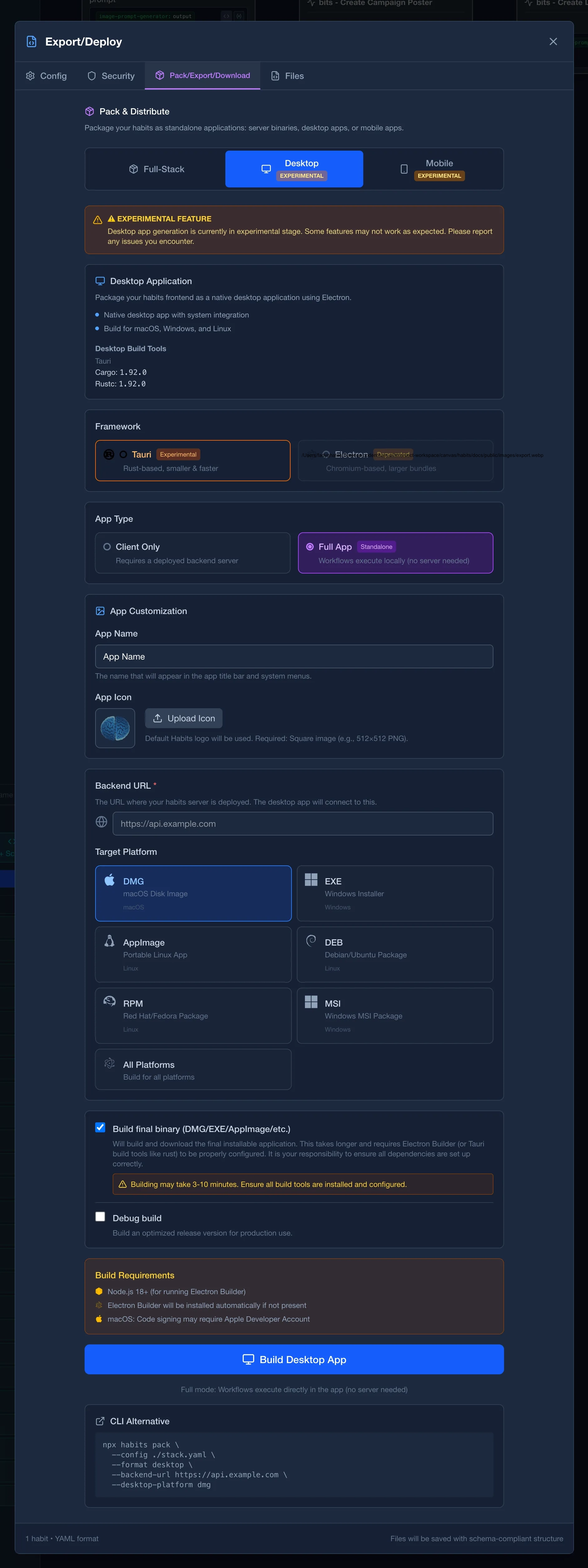
Once your app is working locally, you can package it for distribution. See the Binary Export guide for full details.
Full App vs Client App
Before packaging, decide on your deployment architecture:
| Approach | Best For | Pros | Cons |
|---|---|---|---|
| Full App (Standalone) | Internal tools, demos, kiosk apps | Doesn't require a backend, single package | API keys bundled in app |
| Client App (Remote Backend) | Production apps, public distribution | Secure key storage, scalable, updatable | Requires deployed API |
Security Warning: Full App Builds
When you package with --execution-mode full, your .env file (including API keys) is bundled inside the app. Anyone with the app can extract these keys.
For distributable apps with sensitive keys:
- Use a remote backend: Deploy your habits server and have the app connect via API
- Use
@codenteam/intersect: Secrets vault and management for standalone deployments
Only use full app builds for:
- Development and testing
- Internal tools with non-sensitive credentials
- Demos where key exposure is acceptable
- Internal/Kiosk Micro-Apps that would be only used internally
Full App (Standalone)
Package your entire stack as a standalone native app. Doesn't require a separate backend deployment.
Standalone macOS app with embedded backend. No server required.
npx habits pack --config ./stack.yaml --format desktop-full --desktop-platform dmg --output ./ResumeAnalyzer.dmgAfter packaging:
# The app runs standalone: no server needed
# To override bundled environment variables, place a .env file beside the app
Client App (Remote Backend)
Package the frontend as a native app that connects to your deployed backend. This keeps API keys secure on your server.
macOS app connecting to your deployed backend.
npx habits pack --config ./stack.yaml --format desktop --backend-url https://your-api.example.com --desktop-platform dmg --output ./ResumeAnalyzer.dmgRequirements:
- Node.js 24+
- Backend deployed and accessible at the provided URL
- Desktop: For Tauri builds, Rust and Cargo installed
- Android: Java, Gradle, Android SDK (
ANDROID_HOMEorANDROID_SDK_ROOTset) - iOS: macOS with Xcode (iOS builds only work on macOS)
Using Base UI for Export
You can also export from the Base UI:
- Open Base UI:
npx habits base - Load your stack
- Go to Export tab
- Select export type (Binary, Desktop, or Mobile)
- Configure target platform
- Click Export to download
Habits Stack Preparation Checklist
Basic Stack Requirements
- [ ] Stack has a
namefield instack.yaml - [ ] Each habit has a unique
namefield - [ ] Each habit has at least one node
- [ ] All API keys stored in
.envfile (not in habit files) - [ ]
.envis in.gitignoreif you have a version control - [ ]
.env.exampleexists with required variable names
If using Server-Side or Full-Stack Logic
- [ ] All habits have clear
inputsdefined - [ ] All habits have clear
outputsdefined - [ ] UI points to correct backend endpoints
- [ ] CORS configured if frontend/backend on different origins
Troubleshooting: Cannot Find stack.yaml Error
- [ ] Verify
stack.yamlexists in current directory - [ ] Or provide full path:
--config /path/to/stack.yaml
Troubleshooting: Missing Environment Variable Error
- [ ] Verify
.envfile exists - [ ] Check variable names match references in habits (e.g.,
${OPENAI_API_KEY}) - [ ] Ensure
.envis in same directory asstack.yaml
Exporting for Production Checklist
Note: We are deprecating support for
capacitor,cordova, andelectron. Future releases will rely exclusively ontaurifor desktop and mobile exports. Please migrate any existing projects to usetaurifor best support and compatibility.
If exporting Server-Side or Full-Stack (Recommended: Docker)
- [ ] Stack tested locally and working
- [ ] Export via Base UI: Export → Docker
- [ ] Download
{name}-docker.zip - [ ] Unzip and run:
docker-compose up -d
If exporting Server-Side (Alternative: Single Executable)
- [ ] Stack tested locally and working
- [ ] Export via Base UI → Export tab → Binary
- [ ] Download binary for target platform
- [ ] Run executable on target machine
If exporting Desktop App (Experimental)
- [ ] Stack tested locally and working
- [ ] Backend URL configured (where app will connect)
- [ ] Choose framework:
tauri(recommended) orelectron - [ ] Choose platform:
windows,mac,linux, orall - [ ] Check build tools:
curl http://localhost:3000/habits/base/api/export/binary/supportor in UI - [ ] For Tauri: Rust, Cargo installed
- [ ] Export via Base UI → Export tab → Desktop
- [ ] If first time: Download scaffold (buildBinary: false)
- [ ] If ready for binary: Enable buildBinary: true
- [ ] Download and test on target platform
If exporting Mobile App (Experimental)
- [ ] Stack tested locally and working
- [ ] Backend URL configured (must be accessible from mobile device)
- [ ] Choose framework:
tauri(recommended) - [ ] Choose target:
ios,android, orboth - [ ] Check build tools:
curl http://localhost:3000/habits/base/api/export/binary/support- [ ] For Android: Java, Gradle, Android SDK installed
- [ ] For iOS: macOS with Xcode installed (iOS builds only work on macOS)
- [ ] Set environment variables:
- [ ]
ANDROID_HOMEorANDROID_SDK_ROOTfor Android - [ ] Export via Base UI → Export tab → Mobile
- [ ] If first time: Download scaffold (buildBinary: false)
- [ ] If ready for binary: Enable buildBinary: true
- [ ] Download APK (Android) or IPA (iOS)
- [ ] Test on real device or emulator
Troubleshooting: Desktop/Mobile Build Fails
- [ ] Check
mobileordesktopsection for missing tools - [ ] Install missing dependencies
- [ ] Try scaffold export first (buildBinary: false) to verify config
- [ ] Check logs for specific error messages
- [ ] Via API, Run:
curl http://localhost:3000/habits/base/api/export/binary/support
Troubleshooting: iOS Build Fails
- [ ] Verify you're on macOS (iOS builds require macOS)
- [ ] Verify Xcode is installed:
xcodebuild -version - [ ] Open Xcode at least once to accept license agreements
Troubleshooting: Android Build Fails
- [ ] Verify
ANDROID_HOME/ANDROID_SDK_ROOTis set - [ ] Verify Java and Gradle versions are compatible
- [ ] Check compatibility in support endpoint response
- [ ] Install Android SDK build tools if missing
Next Steps
- Resume Analyzer Showcase: Full showcase page with images and details
- Binary Export: Complete export documentation with all options
- Browse All Examples: Explore more ready-to-use showcases