
Binary Export
Export your habits as standalone applications: server binaries, desktop apps, or mobile apps.
Overview
The Pack feature allows you to package your habits configuration into distributable formats:
- Single Executable - Standalone server binary
- Desktop - Electron desktop application
- Mobile - Cordova mobile application (iOS/Android)
Pack Formats
| Format | Description | Backend | Status |
|---|---|---|---|
single-executable | Node.js Full-stack Binary | Embedded | Available |
desktop | Electron app | Remote URL | Available |
desktop-full | Electron with embedded backend | Embedded | Early Access |
mobile | Cordova app | Remote URL | Available |
mobile-full | Mobile with embedded backend | Embedded | Early Access |
Single Executable (Server Binary)
Package your entire habits configuration into a single executable file that can run without Node.js installed.
Using the Base UI
- Open the Export/Deploy modal in Habits Base UI
- Navigate to the Binary tab
- Select your target platform
- Click Generate Standalone Binary
- The binary will download automatically
Using the CLI
Standalone server binary with embedded backend. No Node.js required to run.
npx habits pack --config ./stack.yaml --format single-executable --output ./my-appCLI Options:
| Option | Description | Default |
|---|---|---|
--config | Path to stack.yaml configuration | Required |
--output | Output path for the binary | Required |
--platform | Target platform | current |
Supported --platform values: darwin-arm64, darwin-x64, linux-x64, win32-x64, current
Features
- Standalone execution - No Node.js installation required
- Embedded configuration - All habits, stack.yaml, and .env bundled inside
- Environment override - Place a
.envfile beside the binary to override bundled settings - Cross-platform - Supports macOS (ARM64, x64), Linux (x64), and Windows (x64)
Environment Override
The binary checks for a .env file in the same directory. If found, those values override the bundled environment variables:
# Run the binary
./habits

# Or with a local .env override
echo "PORT=8080" > .env
./habits  # Now runs on port 8080
Supported Platforms
| Platform | Architecture | Binary Name |
|---|---|---|
| macOS | ARM64 | habits |
| macOS | x64 | habits |
| Linux | x64 | habits |
| Windows | x64 | habits.exe |
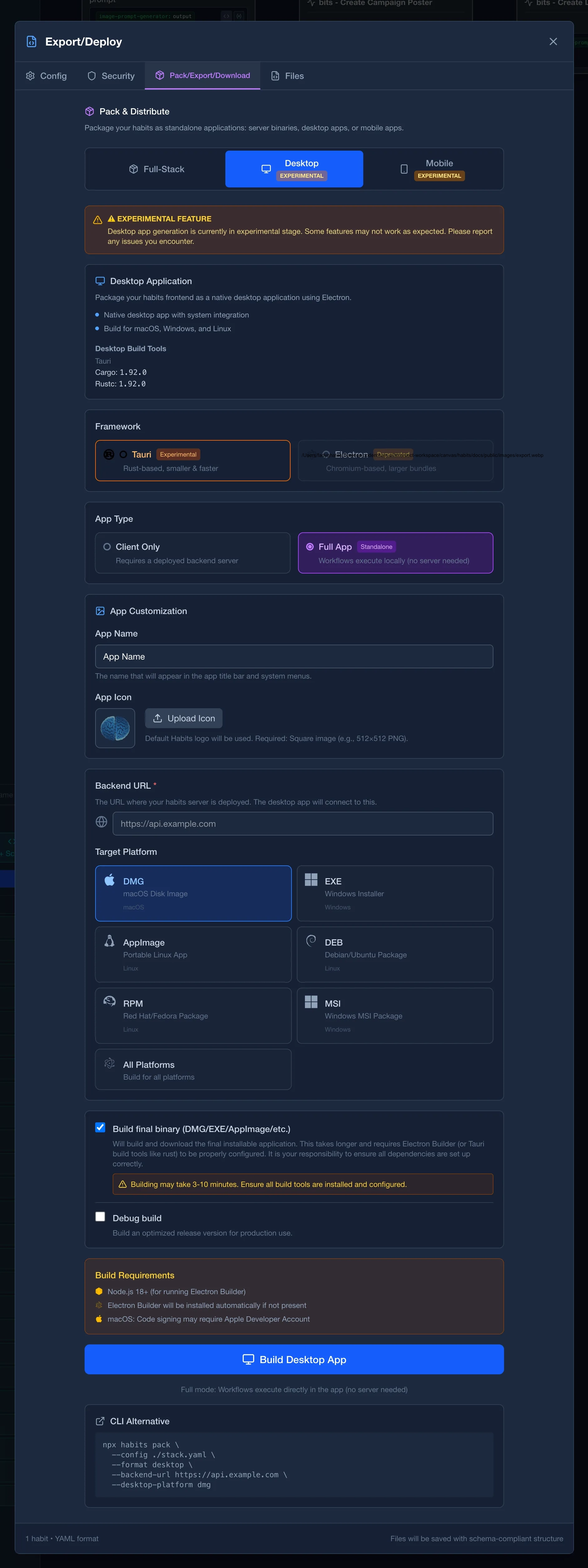
Desktop (Electron)
Package your habits frontend as a desktop application that connects to a remote backend.
Using the CLI
macOS app connecting to your deployed backend.
npx habits pack --config ./stack.yaml --format desktop --backend-url https://your-api.example.com --desktop-platform dmg --output ./my-app.dmgCLI Options:
| Option | Description | Default |
|---|---|---|
--config | Path to stack.yaml configuration | Required |
--format | Must be desktop | Required |
--backend-url | URL of your deployed backend API | Required |
--desktop-platform | Target desktop platform | all |
--output | Output path for the app | Auto-generated |
Supported --desktop-platform values:
| Value | Description |
|---|---|
dmg | macOS disk image |
exe | Windows executable installer |
appimage | Linux AppImage |
deb | Debian/Ubuntu package |
rpm | Red Hat/Fedora package |
msi | Windows MSI installer |
all | All platforms |
Features
- Native desktop app - Runs as a proper desktop application with system integration
- API proxy - All API calls automatically routed to your backend URL
- Cross-platform - Build for macOS, Windows, and Linux from a single codebase
Requirements
- Node.js 20+
- Your frontend must be defined in
stack.yamlunderserver.frontend - Backend must be deployed and accessible at the provided URL
Mobile (Cordova)
Package your habits frontend as a mobile application for iOS and Android.
Using the CLI
Android app connecting to your deployed backend.
npx habits pack --config ./stack.yaml --format mobile --backend-url https://your-api.example.com --mobile-target android --output ./my-app.apkCLI Options:
| Option | Description | Default |
|---|---|---|
--config | Path to stack.yaml configuration | Required |
--format | Must be mobile | Required |
--backend-url | URL of your deployed backend API | Required |
--mobile-target | Target mobile platform | both |
--output | Output path for the app | Auto-generated |
Supported --mobile-target values:
| Value | Description |
|---|---|
ios | iOS app (requires macOS with Xcode) |
android | Android app (requires Android SDK) |
both | Both iOS and Android |
Features
- Native mobile app - Proper mobile application with native capabilities
- API proxy - All API calls automatically routed to your backend URL
- Cross-platform - Build for iOS and Android from the same frontend
Requirements
- Node.js 20+
- iOS: macOS with Xcode installed
- Android: Android SDK and build tools
- Your frontend must be defined in
stack.yamlunderserver.frontend - Backend must be deployed and accessible at the provided URL
Early Access
Desktop Full (desktop-full)
Full Electron application with the backend embedded, enabling completely offline operation.
Standalone macOS app with embedded backend. No server required.
npx habits pack --config ./stack.yaml --format desktop-full --desktop-platform dmg --output ./my-app.dmgMobile Full (mobile-full)
Full mobile application with the backend embedded, enabling completely offline operation.
Standalone Android app with embedded backend. No server required.
npx habits pack --config ./stack.yaml --format mobile-full --mobile-target android --output ./my-app.apkGeneral Requirements
- Node.js 20+ (for generation only)
- Signing of packages isn't included