
Running Automations
This guide explains how to use Cortex to run and manage your automation habits.
Overview
Cortex is the lightweight execution engine at the heart of Habits. Cortex is designed to be minimal and embeddable, perfect for serverless deployments, edge computing, or bundling into your own applications.
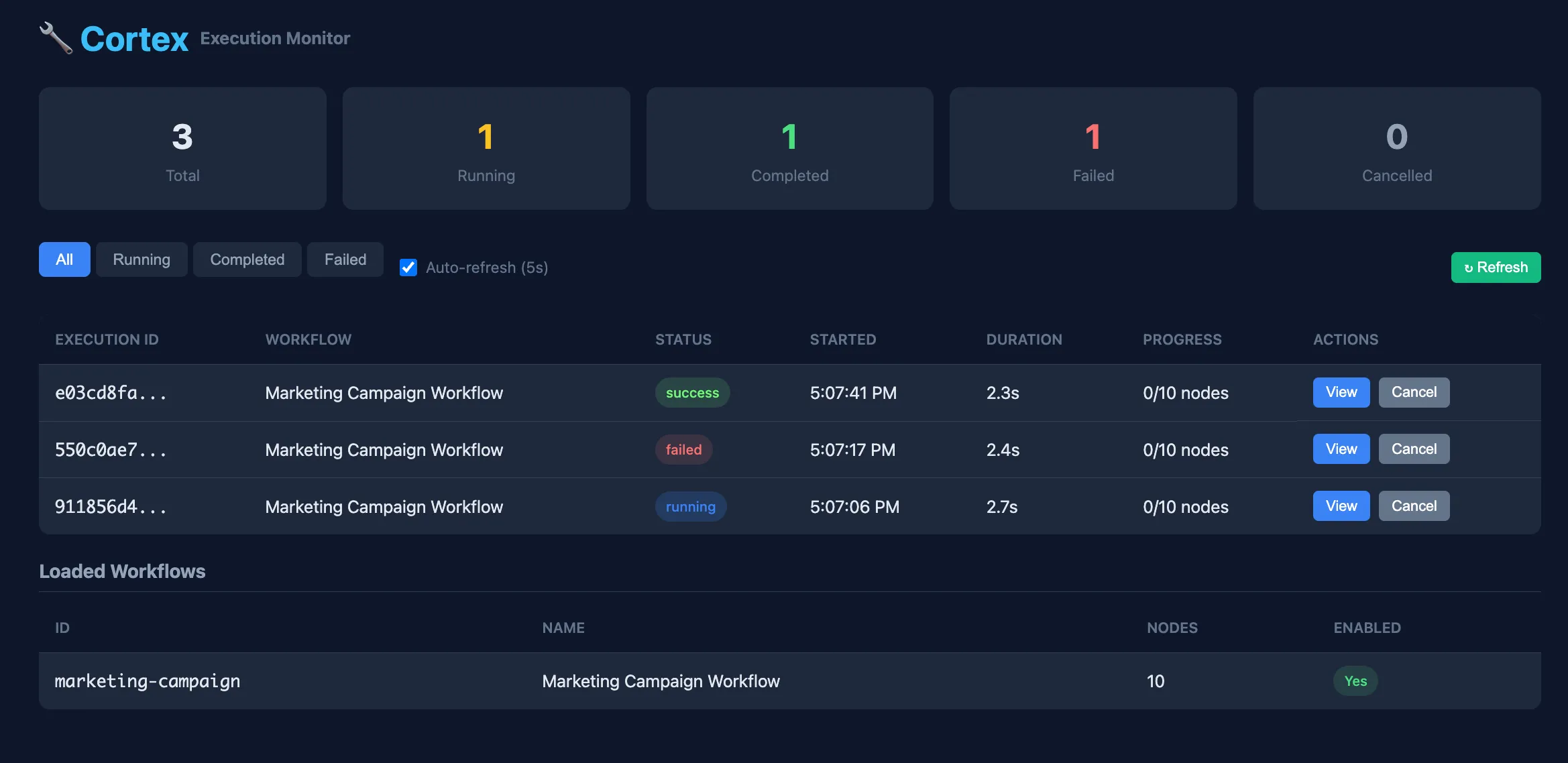 Cortex Engine - Lightweight Runtime Executor
Lightweight by Design
Cortex runs your workflows without the overhead of a full platform. Deploy it to AWS Lambda, Cloudflare Workers, or embed it directly in your SaaS product.
Triggers (Cues)
In the Habit Loop, the Cue is the trigger that initiates your automation. Habits supports multiple trigger methods:
| Trigger Type | Description | Status |
|---|---|---|
| CLI | Execute workflows from the command line | Available |
| REST API | Trigger workflows via HTTP endpoints | Available |
| Bits Watchers | Event-based triggers from Habits bits | Available |
CLI Triggers
The CLI is ideal for manual execution, cron jobs, CI/CD pipelines, and local testing:
npx @ha-bits/cortex@latest execute ./showcase/marketing-campaign/stack.yamlREST API Triggers
The REST API is the primary method for integrating with external systems and services. See the Swagger OpenAPI section below for complete details about the generated endpoints. To run in server mode, use this command:å
npx @ha-bits/cortex@latest server --config ./showcase/marketing-campaign/stack.yamlHow to Run Cortex
There are three main ways to run Cortex depending on your use case:
1. Using nx (Local Development)
If you're developing locally and have cloned the repository, use nx to run Cortex:
# Run the dev target (uses preconfigured test config)
npx nx dev @ha-bits/cortex --config=./showcase/hello-world/stack.yaml
This is the recommended approach when:
- You're actively developing or debugging Cortex
- You need hot-reloading during development
- You're contributing to the codebase
2. Using the Playground Script
For quickly testing habits within Docker and an example configurations, use the playground script:
bash packages/cortex/server/playground/run.bash --config=./showcase/marketing-campaign/stack.yamlAvailable options:
--config=<path>: Specify the example to run (e.g.,--config ./showcase/marketing-campaign/stack.yaml)- The playground provides a preconfigured environment for testing
This is ideal for:
- Trying out example workflows
- Testing habit configurations
- Quick prototyping without full setup
3. Using npx (Production/Standalone)
For production use or running Cortex as a standalone tool, use npx:
npx @ha-bits/cortexWith additional options:
# Run with a specific habit file
npx @ha-bits/cortex --habit ./path/to/habit.json

# Run with custom configuration
npx @ha-bits/cortex --config ./stack.yaml

# Run on a specific port
npx @ha-bits/cortex --port 3000
This approach is best for:
- Production deployments
- Running Cortex without cloning the repository
- CI/CD pipelines
- Quick execution of habits
Cortex Components
Cortex consists of several components that work together to execute and manage habits:
| Component | Path | Description |
|---|---|---|
| Web UI | /manage | Visual interface for managing and monitoring habits |
| API | /api | RESTful API for programmatic access |
| Swagger Docs | /api/docs | Interactive API documentation |
Cortex Web UI
The Cortex UI provides a visual interface for managing your habits.
Accessing the UI
Navigate to /cortex in your browser to access the Cortex dashboard.
Dashboard Features
- Habits List: View all available habits
- Execution History: See past runs and their status
- Real-time Monitoring: Watch habits execute in real-time
- Logs: Access detailed execution logs
Running a Habit from the UI
- Navigate to the Habits list
- Select the habit you want to run
- Click "Run" or "Execute"
- Monitor the execution progress
Cortex API
Cortex provides a RESTful API for programmatic access to all functionality.
API Base URL
http://your-host/apiCommon Endpoints
| Method | Endpoint | Description |
|---|---|---|
GET | /misc/workflows | List all habits |
GET | /misc/workflow/:id | Get a specific habit |
POST | /api/:id | Execute a habit |
GET | /misc/executions | List execution history |
GET | /misc/executions/:id | Get execution details |
Example: Execute a Habit
curl -X POST http://localhost:3000/api/my-habit-id \
  -H "Content-Type: application/json" \
  -d '{"input": {"key": "value"}}'
Example: Check Execution Status
curl http://localhost:3000/misc/executions/execution-idSwagger API Documentation
Cortex includes interactive API documentation powered by Swagger/OpenAPI.
Accessing Swagger Docs
Navigate to /api/docs in your browser to access the interactive documentation.
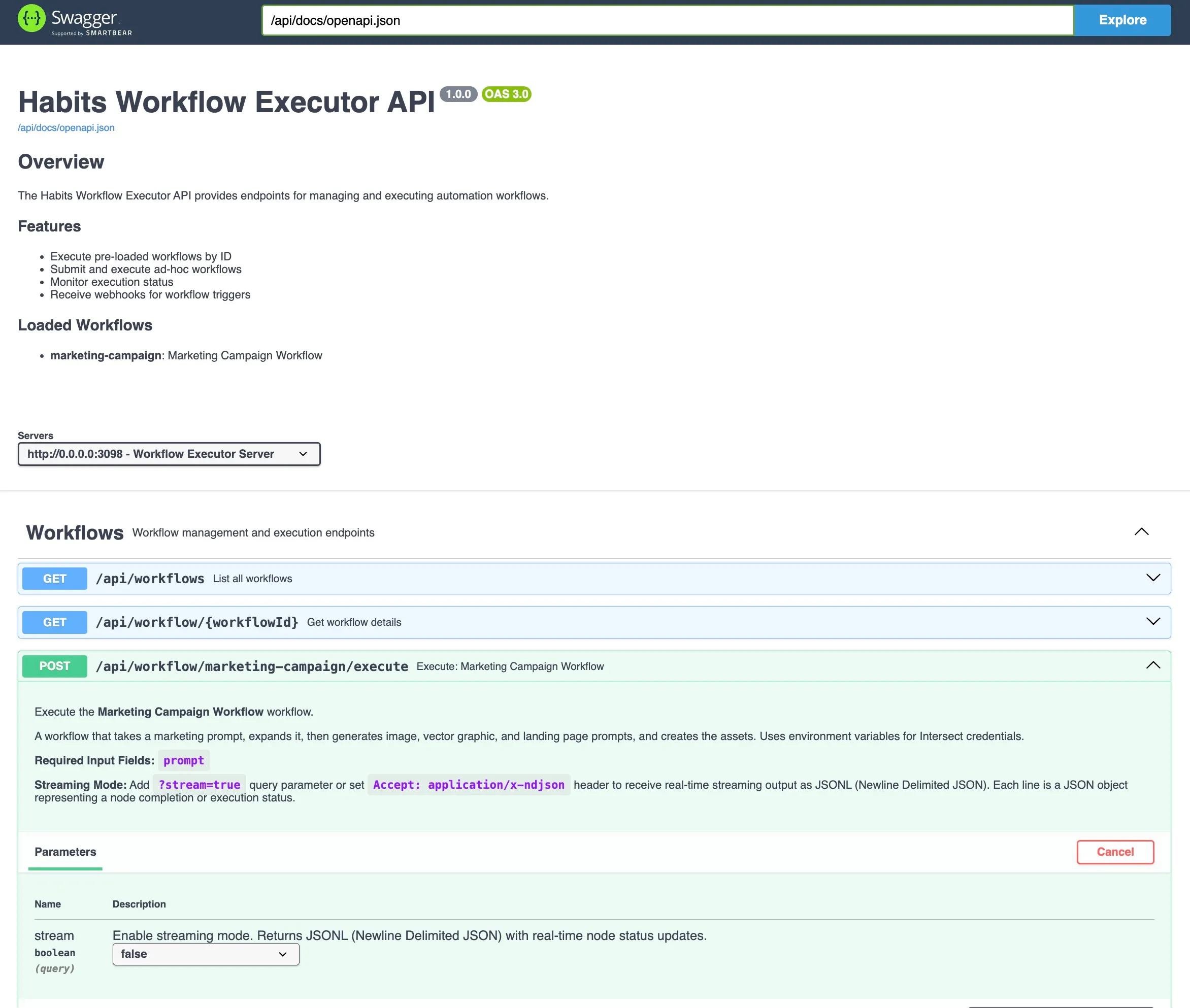 OpenAPI Swagger - Auto-generated API documentation
Features
- Interactive Testing: Try API calls directly from the browser
- Schema Documentation: View request/response schemas
- Authentication: Configure API keys for authenticated endpoints
- Code Examples: Generate code snippets for various languages
Execution Modes
Manual Execution
Trigger habits manually through:
- The Cortex UI "Run" button
- API calls to the execute endpoint
- CLI commands
Scheduled Execution
Set up habits to run on a schedule:
- Open the habit in the UI
- Navigate to "Schedule" settings
- Configure the cron expression or interval
Webhook Triggers
Habits can be triggered via webhooks:
- Enable webhook trigger for your habit
- Copy the generated webhook URL
- Send a POST request to trigger execution
curl -X POST http://localhost:3000/api/webhooks/your-webhook-id \
  -H "Content-Type: application/json" \
  -d '{"event": "triggered"}'
Monitoring and Logs
Execution History
View all past executions in the Cortex UI:
Real-time Logs
Monitor habit execution in real-time:
- Click on an active execution
- View logs as they stream
- See bit-by-bit progress
Error Handling
When a habit fails:
- The execution is marked as "Failed"
- Error details are captured
- You can retry the execution from the point of failure
Configuration
Environment Variables
Configure Cortex behavior through environment variables or config file:
| Variable | Description | Default |
|---|---|---|
PORT | API server port | 3000 |
LOG_LEVEL | Logging verbosity | info |
DATABASE_URL | Database connection string | - |
Config File
Cortex reads from config.json in the project root:
{
  "server": {
    "port": 3000
  },
  "execution": {
    "timeout": 30000,
    "retries": 3
  }
}
Best Practices
- Monitor Executions: Regularly check execution history for failures
- Set Timeouts: Configure appropriate timeouts for long-running habits
- Use Webhooks: For event-driven automation, prefer webhooks over polling
- Secure Your API: Use authentication for production deployments
Packing & Distributing
Pack your habits into portable formats for different deployment targets:
| Format | Output | Use Case |
|---|---|---|
single-executable | Standalone binary | FullStack, Frontend + backend, Server/CLI, no Node.js needed |
desktop | Electron app | Desktop UI connecting to remote backend (or local execution: Early Access) |
mobile | Cordova app | iOS/Android app connecting to remote backend (or local exeuction: Early Access) |
Single Executable (Server Binary)
Standalone server binary with embedded backend. No Node.js required to run.
npx habits pack --config ./stack.yaml --format single-executable --output ./my-appDesktop & Mobile Apps (Client Mode)
macOS app connecting to your deployed backend.
npx habits pack --config ./stack.yaml --format desktop --backend-url https://your-api.example.com --desktop-platform dmg --output ./my-app.dmgDesktop platforms: dmg, exe, appimage, deb, rpm, msi
Mobile targets: android, ios
Platform Requirements
| Format | Requirements |
|---|---|
single-executable | Node.js 20+ (build only), macOS requires code signing |
desktop | Node.js 18+, electron-builder (auto-installed) |
mobile | Cordova CLI (npm i -g cordova), Android SDK (gradle, etc) or Xcode |
Mobile Setup
Android: Install Android Studio, set ANDROID_HOME, ensure gradle 8.x is available
iOS: macOS only, requires Xcode with command line tools
See Binary Export for details on single-executable binaries.
Next Steps
- Review the Concepts guide to understand core terminology
- Learn how to build habits in the Creating Habits guide
- Binary Export - Package your habits as a standalone executable