
Build your first habit in 5 minutes (Habit-as-Code) (Mix n8n/ActivePieces)
This guide walks you through creating a multi-module workflow that generates text with OpenAI (Activepieces), converts it to speech with ElevenLabs (n8n), and uploads the audio to S3 (script)
Quick Start
Already packed and ready to go! Download example.zip and extract it to get started immediately.
Deprecation Notice
n8n and ActivePieces nodes are being deprecated. We are removing support for n8n and ActivePieces nodes in favor of native Habits bits, which are MIT licensed with no commercial restrictions. Migrate your workflows to use Habits bits for long-term compatibility.
Environment Setup Checklist
Install Node Version Manager (nvm)
- [ ] macOS/Linux: Install nvm:
curl -o- https://raw.githubusercontent.com/nvm-sh/nvm/v0.40.1/install.sh | bash - [ ] Windows: Use nvm-windows or download Node.js directly from nodejs.org
- [ ] Restart terminal or run:
source ~/.bashrc(or~/.zshrc) - [ ] Verify nvm:
nvm --version
Install Node.js 24
- [ ] Install Node.js 24:
nvm install 24 - [ ] Set as default:
nvm alias default 24 - [ ] Verify Node.js:
node --version(should show v24.x.x)
Code-First Approach (HaC) Checklist
- [ ] Directory contains exactly one
stack.yamlfile - [ ] Directory contains at least one habit file (
.yamlor.json) - [ ]
.envfile exists in same directory - [ ] Run:
npx habits@latest cortex --config ./stack.yaml - [ ] Access UI at
http://localhost:3000 - [ ] For @next version:
npx habits@nextinstead ofnpx habits@latest
Workflow
The workflow chains three nodes across different modules: an Activepieces node for text generation, an n8n node for text-to-speech, and a script node for saving locally. Each node references the previous node's output via {{<id>}}.
id: marketing-campaign
name: Marketing Campaign
description: >-
  A workflow that takes a marketing prompt, expands it, then generates image,
  vector graphic, and landing page prompts, and creates the assets. Uses
  environment variables for Intersect credentials.
version: "1.0"
nodes:
  - id: prompt-expander
    type: bits
    position:
      x: 316.9991487026001
      y: -11.984291402917478
    data:
      label: Prompt Expander
      framework: bits
      source: npm
      module: "@ha-bits/bit-intersect"
      operation: ask_chatgpt
      params:
        model: gpt-5-mini
        prompt: "In 2 sentences, summarize this marketing idea: {{habits.input.prompt}}"
        temperature: 0.7
        maxTokens: 50
      credentials:
        intersect:
          host: "{{habits.env.HABITS_INTERSECT_HOST}}"
          apiKey: "{{habits.env.HABITS_INTERSECT_API_KEY}}"
  - id: image-prompt-generator
    type: bits
    position:
      x: -418.2645195621046
      y: 140.3164235298582
    data:
      label: Image Prompt Generator
      framework: bits
      source: npm
      module: "@ha-bits/bit-intersect"
      operation: ask_chatgpt
      params:
        model: gpt-5-mini
        prompt: "Write a 10-word image prompt for: {{prompt-expander}}"
        temperature: 0.8
        maxTokens: 30
      credentials:
        intersect:
          host: "{{habits.env.HABITS_INTERSECT_HOST}}"
          apiKey: "{{habits.env.HABITS_INTERSECT_API_KEY}}"
  - id: poster-prompt-generator
    type: bits
    position:
      x: 97.70801606792486
      y: 261.38576897811544
    data:
      label: Poster/SVG Prompt Generator
      framework: bits
      source: npm
      module: "@ha-bits/bit-intersect"
      operation: ask_chatgpt
      params:
        model: gpt-5-mini
        prompt: "In 1 sentence, describe a poster for: {{prompt-expander}}"
        temperature: 0.7
        maxTokens: 30
      credentials:
        intersect:
          host: "{{habits.env.HABITS_INTERSECT_HOST}}"
          apiKey: "{{habits.env.HABITS_INTERSECT_API_KEY}}"
  - id: landing-page-prompt-generator
    type: bits
    position:
      x: 560.5038333522873
      y: 157.83893892996755
    data:
      label: Landing Page Prompt Generator
      framework: bits
      source: npm
      module: "@ha-bits/bit-intersect"
      operation: ask_chatgpt
      params:
        model: gpt-5-mini
        prompt: "In 1 sentence, describe a landing page for: {{prompt-expander}}"
        temperature: 0.7
        maxTokens: 30
      credentials:
        intersect:
          host: "{{habits.env.HABITS_INTERSECT_HOST}}"
          apiKey: "{{habits.env.HABITS_INTERSECT_API_KEY}}"
  - id: image-generator
    type: bits
    position:
      x: -538.3046602363528
      y: 406.9169822999188
    data:
      label: Generate Marketing Image
      framework: bits
      source: npm
      module: "@ha-bits/bit-intersect"
      operation: generate_image
      params:
        model: gpt-image-1
        prompt: "{{image-prompt-generator}}"
        resolution: 1024x1024
        quality: hd
      credentials:
        intersect:
          host: "{{habits.env.HABITS_INTERSECT_HOST}}"
          apiKey: "{{habits.env.HABITS_INTERSECT_API_KEY}}"
  - id: website-creator
    type: bits
    position:
      x: 601.9516565016136
      y: 400.12206784113823
    data:
      label: Create Landing Page
      framework: bits
      source: npm
      module: "@ha-bits/bit-intersect"
      operation: create_canvas
      params:
        type: webcanvas
        prompt: "{{landing-page-prompt-generator}}"
      credentials:
        intersect:
          host: "{{habits.env.HABITS_INTERSECT_HOST}}"
          apiKey: "{{habits.env.HABITS_INTERSECT_API_KEY}}"
  - id: pr-document-prompt-generator
    type: bits
    position:
      x: 740.5166897725798
      y: -47.75467317216666
    data:
      label: PR Document Prompt Generator
      framework: bits
      source: npm
      module: "@ha-bits/bit-intersect"
      operation: ask_chatgpt
      params:
        model: gpt-5-mini
        prompt: "In 1 sentence, describe a PR doc for: {{prompt-expander}}"
        temperature: 0.7
        maxTokens: 30
      credentials:
        intersect:
          host: "{{habits.env.HABITS_INTERSECT_HOST}}"
          apiKey: "{{habits.env.HABITS_INTERSECT_API_KEY}}"
  - id: pr-document-creator
    type: bits
    position:
      x: 1004.6370804819302
      y: 551.0352237895758
    data:
      label: Create PR Campaign Document
      framework: bits
      source: npm
      module: "@ha-bits/bit-intersect"
      operation: create_canvas
      params:
        type: draftcanvas
        prompt: "{{pr-document-prompt-generator}}"
      credentials:
        intersect:
          host: "{{habits.env.HABITS_INTERSECT_HOST}}"
          apiKey: "{{habits.env.HABITS_INTERSECT_API_KEY}}"
  - id: poster-creator
    type: bits
    position:
      x: 250
      y: 550
    data:
      label: Create Campaign Poster
      framework: bits
      source: npm
      module: "@ha-bits/bit-intersect"
      operation: create_canvas
      params:
        type: svgcanvas
        prompt: "{{poster-prompt-generator}}"
      credentials:
        intersect:
          host: "{{habits.env.HABITS_INTERSECT_HOST}}"
          apiKey: "{{habits.env.HABITS_INTERSECT_API_KEY}}"
edges:
  - id: e1
    source: prompt-expander
    target: image-prompt-generator
  - id: e2
    source: prompt-expander
    target: poster-prompt-generator
  - id: e3
    source: prompt-expander
    target: landing-page-prompt-generator
  - id: e4
    source: image-prompt-generator
    target: image-generator
  - id: e6
    source: landing-page-prompt-generator
    target: website-creator
  - id: e7
    source: prompt-expander
    target: pr-document-prompt-generator
  - id: e8
    source: pr-document-prompt-generator
    target: pr-document-creator
  - id: e9
    source: poster-prompt-generator
    target: poster-creator
output:
  originalPrompt: "{{habits.input.prompt}}"
  expandedConcept: "{{prompt-expander}}"
  imagePrompt: "{{image-prompt-generator}}"
  posterPrompt: "{{poster-prompt-generator}}"
  landingPagePrompt: "{{landing-page-prompt-generator}}"
  prDocumentPrompt: "{{pr-document-prompt-generator}}"
  generatedImage: "{{image-generator}}"
  landingPage: "{{website-creator}}"
  prDocument: "{{pr-document-creator}}"
  poster: "{{poster-creator}}"
Configuration
Create stack.yaml to define the server settings and workflow paths:
{
  "version": "1.0",
  "name": "Marketing Campaign",
  "workflows": [
    {
      "id": "marketing-campaign",
      "path": "./habit.yaml",
      "enabled": true,
      "webhookTimeout": 30000
    }
  ],
  "server": {
    "port": 13000,
    "host": "0.0.0.0",
    "frontend": "./frontend",
    "openapi": true
  },
  "defaults": {
    "webhookTimeout": 30000
  }
}
Environment Variables
Create a .env file for secrets:
# Intersect Marketing Campaign Example Environment Variables
# Copy this file to .env and fill in your credentials

# Required: Intersect host URL
HABITS_INTERSECT_HOST=https://your-intersect-instance.site

# Required: Your Intersect API key
HABITS_INTERSECT_API_KEY=your-api-key-here
Run the Habit
cd path/to/habit
npx @ha-bits/cortex@latest server --config ./stack.yaml
n8n License Warning
When running habits that use n8n nodes, you will see this warning in the terminal:
================================================================================
⚠️  LICENSE WARNING: n8n is NOT open source!
================================================================================
n8n packages are licensed under the Sustainable Use License (SUL).
You CANNOT redistribute or use n8n commercially without a license.
If you don't have a valid n8n license, you can't use this habit for non-personal usage.
Use MIT licensed alternatives: ActivePieces pieces or Habits bits.
================================================================================
Enabling Features
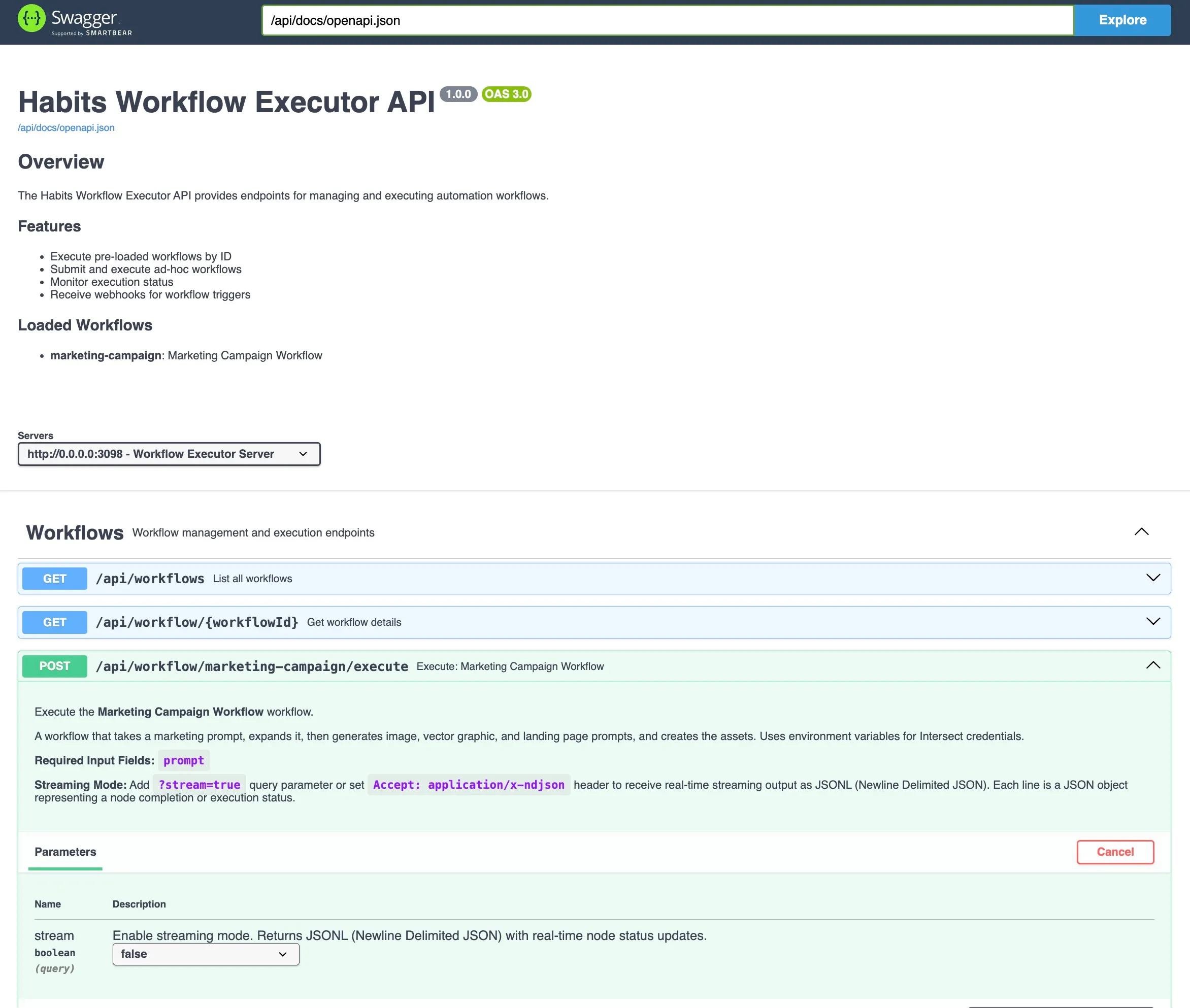
- Swagger API: Set Env var
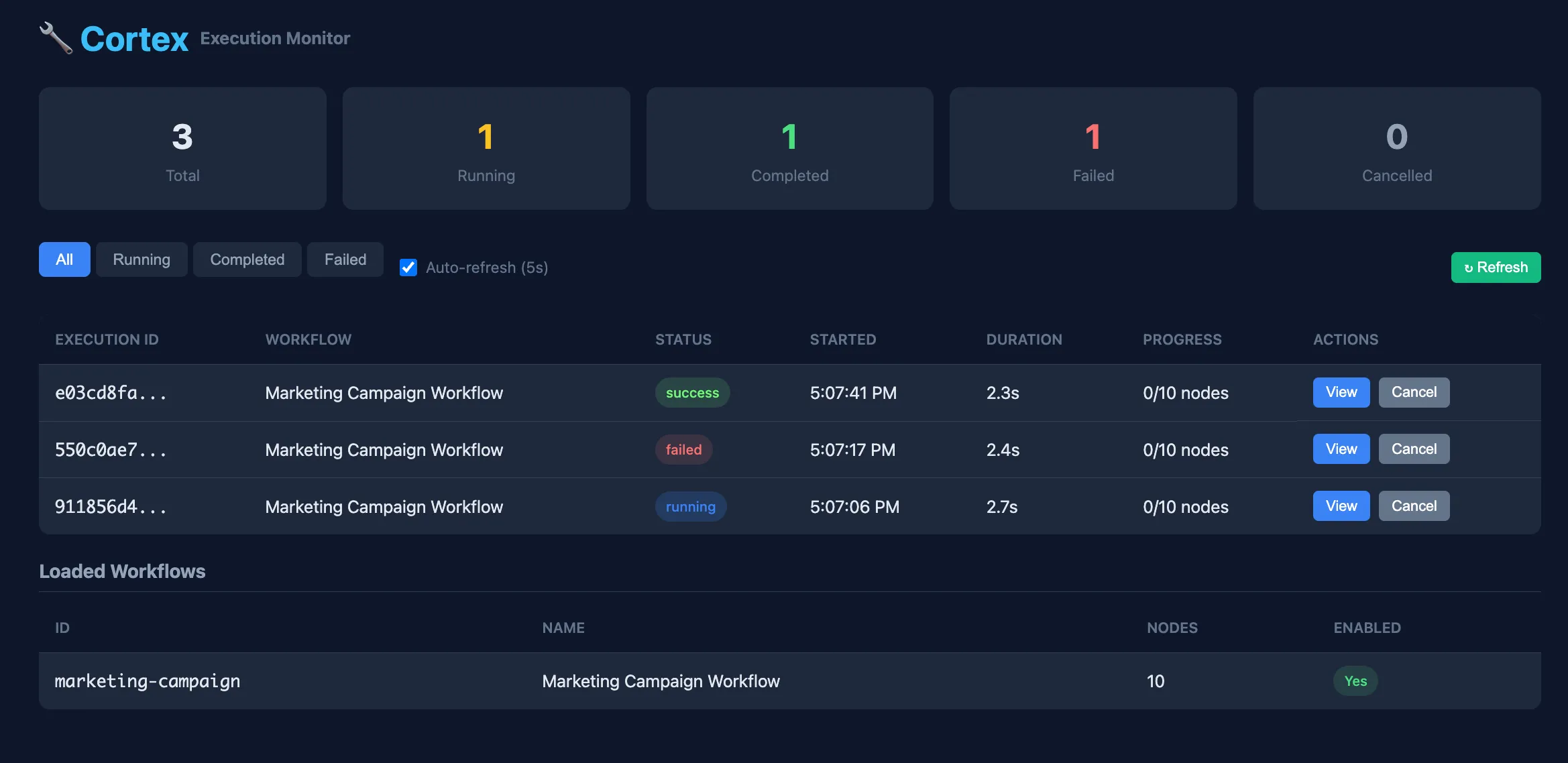
HABITS_OPENAPI_ENABLED=true→ access athttp://localhost:3000/api/docs - Management Portal: Set Env var
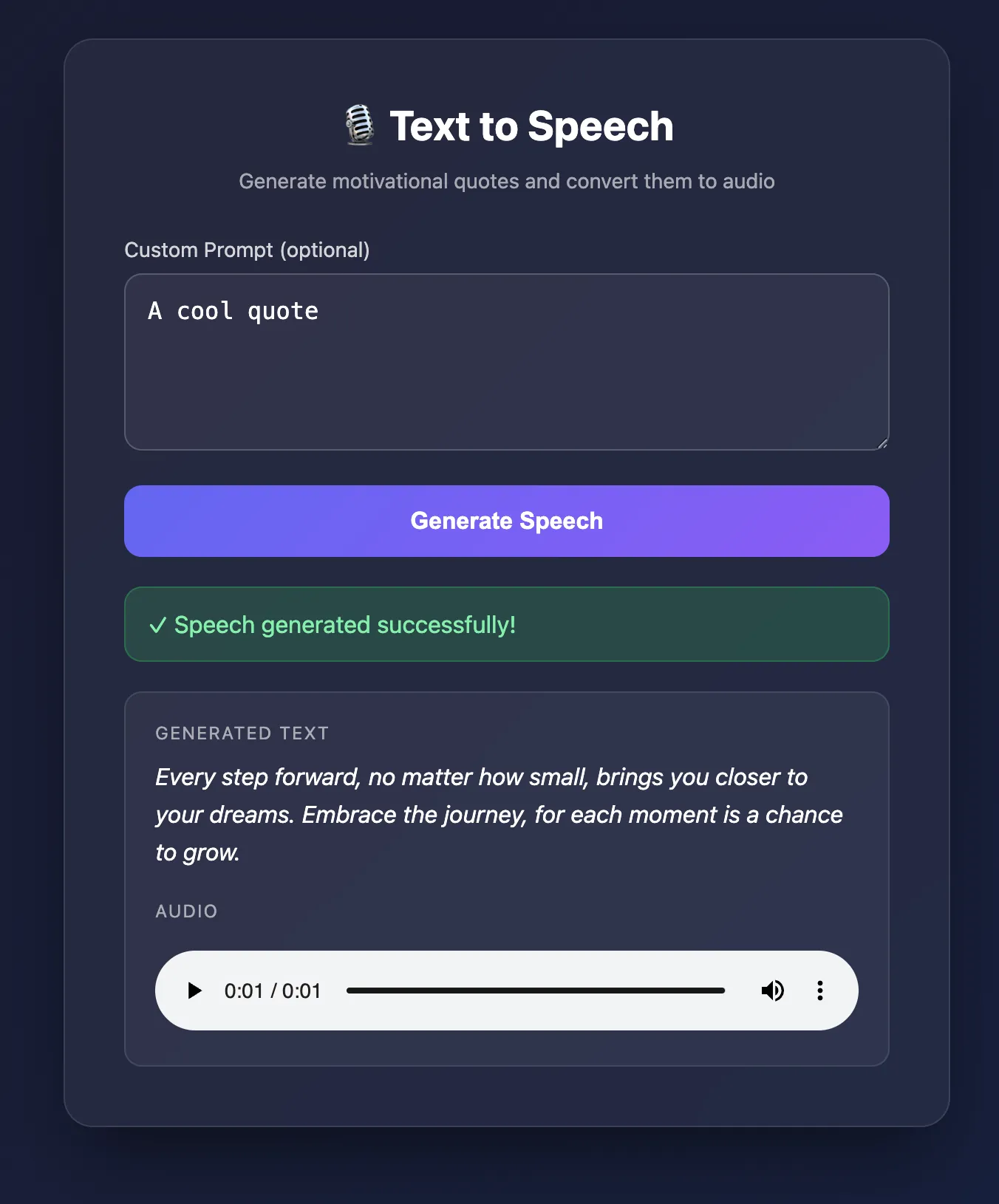
HABITS_MANAGE_ENABLED=trueto enable the built-in workflow management UI - Frontend: Set
"frontend": "frontend"in the server block in stack.yaml → served at root/
Swagger API Explorer
When HABITS_OPENAPI_ENABLED=true, the Swagger UI is available at /api/docs. It provides interactive documentation for all workflow endpoints, allowing you to test triggers and inspect request/response schemas directly from the browser.
Frontend UI
Set the frontend config option to serve a simple web interface at the root path. This is ideal for building custom dashboards or trigger forms that interact with your workflows via the REST API.
Management Portal
Enable HABITS_MANAGE_ENABLED=true to access the built-in management portal at /manage. This UI lets you view registered workflows, monitor execution status, and inspect node configurations without touching the JSON files.
Habits Stack Preparation Checklist
Basic Stack Requirements
- [ ] Stack has a
namefield instack.yaml - [ ] Each habit has a unique
namefield - [ ] Each habit has at least one node
- [ ] All API keys stored in
.envfile (not in habit files) - [ ]
.envis in.gitignoreif you have a version control - [ ]
.env.exampleexists with required variable names
If using Server-Side or Full-Stack Logic
- [ ] All habits have clear
inputsdefined - [ ] All habits have clear
outputsdefined - [ ] UI points to correct backend endpoints
- [ ] CORS configured if frontend/backend on different origins
Troubleshooting: Cannot Find stack.yaml Error
- [ ] Verify
stack.yamlexists in current directory - [ ] Or provide full path:
--config /path/to/stack.yaml
Troubleshooting: Missing Environment Variable Error
- [ ] Verify
.envfile exists - [ ] Check variable names match references in habits (e.g.,
${OPENAI_API_KEY}) - [ ] Ensure
.envis in same directory asstack.yaml
Exporting for Production
Note: We are deprecating support for
capacitor,cordova, andelectron. Future releases will rely exclusively ontaurifor desktop and mobile exports. Please migrate any existing projects to usetaurifor best support and compatibility.
If exporting Server-Side or Full-Stack (Recommended: Docker)
- [ ] Stack tested locally and working
- [ ] Export via Base UI: Export → Docker
- [ ] Download
{name}-docker.zip - [ ] Unzip and run:
docker-compose up -d
If exporting Server-Side (Alternative: Single Executable)
- [ ] Stack tested locally and working
- [ ] Export via Base UI → Export tab → Binary
- [ ] Download binary for target platform
- [ ] Run executable on target machine
If exporting Desktop App (Experimental)
- [ ] Stack tested locally and working
- [ ] Backend URL configured (where app will connect)
- [ ] Choose framework:
tauri(recommended) orelectron - [ ] Choose platform:
windows,mac,linux, orall - [ ] Check build tools:
curl http://localhost:3000/habits/base/api/export/binary/supportor in UI - [ ] For Tauri: Rust, Cargo installed
- [ ] Export via Base UI → Export tab → Desktop
- [ ] If first time: Download scaffold (buildBinary: false)
- [ ] If ready for binary: Enable buildBinary: true
- [ ] Download and test on target platform
If exporting Mobile App (Experimental)
- [ ] Stack tested locally and working
- [ ] Backend URL configured (must be accessible from mobile device)
- [ ] Choose framework:
tauri(recommended) - [ ] Choose target:
ios,android, orboth - [ ] Check build tools:
curl http://localhost:3000/habits/base/api/export/binary/support- [ ] For Android: Java, Gradle, Android SDK installed
- [ ] For iOS: macOS with Xcode installed (iOS builds only work on macOS)
- [ ] Set environment variables:
- [ ]
ANDROID_HOMEorANDROID_SDK_ROOTfor Android - [ ] Export via Base UI → Export tab → Mobile
- [ ] If first time: Download scaffold (buildBinary: false)
- [ ] If ready for binary: Enable buildBinary: true
- [ ] Download APK (Android) or IPA (iOS)
- [ ] Test on real device or emulator
Troubleshooting: Desktop/Mobile Build Fails
- [ ] Check
mobileordesktopsection for missing tools - [ ] Install missing dependencies
- [ ] Try scaffold export first (buildBinary: false) to verify config
- [ ] Check logs for specific error messages
- [ ] Via API, Run:
curl http://localhost:3000/habits/base/api/export/binary/support
Troubleshooting: iOS Build Fails
- [ ] Verify you're on macOS (iOS builds require macOS)
- [ ] Verify Xcode is installed:
xcodebuild -version - [ ] Open Xcode at least once to accept license agreements
Troubleshooting: Android Build Fails
- [ ] Verify
ANDROID_HOME/ANDROID_SDK_ROOTis set - [ ] Verify Java and Gradle versions are compatible
- [ ] Check compatibility in support endpoint response
- [ ] Install Android SDK build tools if missing
Next Steps
Ready to explore more? Check out the Examples section for real-world use cases including:
- Email Classification - AI-powered email categorization
- Minimal Blog - Full CMS backend with authentication
- Marketing Campaign - Multi-channel content generation
Deployment Options
- Binary Export - Package your habit as a standalone executable file.